Skip to content

エージェントのリファレンス

カスタムエージェントを作成する際、インストラクションや出力スキーマなどの主要な設定の詳細については、この記事を参照してください。概要については、Braze エージェントおよびよくある質問を参照してください。

モデル

エージェントを設定するときに、レスポンスの生成に使用するモデルを選択できます。Brazeパワードモデルの使用と、独自のAPIキーの持ち込みの2つのオプションがあります。

オプション 1: Brazeパワードモデルを使用する

これは最もシンプルなオプションで、追加のセットアップは不要です。Brazeは大規模言語モデル(LLM)への直接アクセスを提供します。このオプションを使用するには、Geminiモデルを使用するAutoを選択します。

オプション 2: 独自のAPIキーを持ち込む

このオプションでは、OpenAI、Anthropic、Google GeminiなどのプロバイダーにBrazeアカウントを接続できます。LLMプロバイダーから独自のAPIキーを持ち込む場合、トークンコストはBrazeではなくプロバイダーを通じて直接請求されます。

レガシーモデルは数か月後に廃止または非推奨になる可能性があるため、最新のモデルを定期的にテストすることをお勧めします。また、通知設定でエージェントコンソールの通知に登録すると、Brazeがモデルの利用不可を検出した際にアラートを受け取ることができます。

設定方法:

  1. パートナー連携 > テクノロジーパートナーに移動し、プロバイダーを見つけます。
  2. プロバイダーから取得したAPIキーを入力します。
  3. 保存を選択します。

その後、エージェントに戻ってモデルを選択できます。

Braze提供のLLMを使用する場合、そのモデルのプロバイダーは、お客様とBraze間のデータ処理補遺(DPA)の条件に従い、Brazeのサブプロセッサーとして機能します。独自のAPIキーを持ち込むことを選択した場合、LLMサブスクリプションのプロバイダーは、お客様とBraze間の契約に基づくサードパーティプロバイダーと見なされます。

思考レベル

一部のLLMプロバイダーでは、選択したモデルの思考レベルを調整できます。思考レベルは、モデルが回答する前に使用する思考の範囲を定義します。素早く直接的なレスポンスから、より長い推論の連鎖まで対応します。これはレスポンスの品質、レイテンシー、トークン使用量に影響します。

レベル 使用するタイミング
Minimal シンプルで明確に定義されたタスク(カタログ検索、単純な分類など)。最速のレスポンスで最低コストです。
Low もう少し推論が必要だが、深い分析は不要なタスク。
Medium 複数ステップまたはニュアンスのあるタスク(複数の入力を分析してアクションを推奨するなど)。
High 複雑な推論、エッジケース、またはモデルにステップを踏んで回答させたい場合。

まずMinimalから始めて、エージェントのレスポンスをテストすることをお勧めします。エージェントが正確な回答を提供するのに苦労している場合は、思考レベルをLowまたはMediumに調整できます。まれにHighの思考レベルが必要になることがありますが、このレベルを使用するとトークンコストが高くなり、レスポンス時間が長くなったり、タイムアウトエラーのリスクが高くなったりする可能性があります。エージェントが複数ステップの推論と妥当なレスポンス時間のバランスに苦労している場合は、ユースケースを複数のエージェントに分割し、Canvasやカタログで連携させることを検討してください。

Brazeは、コネクテッドコンテンツと同じIP範囲をアウトバウンドLLMコールに使用します。範囲はコネクテッドコンテンツIP許可リストに記載されています。プロバイダーがIP許可リストをサポートしている場合、Brazeのみがキーを使用できるようにこれらの範囲に制限できます。

使用するモデルの決定

各LLMプロバイダーは、モデルの能力、コスト、思考レベルの組み合わせがそれぞれ異なります。以下に一般的なガイドラインとベストプラクティスを示します。

  • コスト効率を重視する場合は、高コストモデルよりも低トークンコストモデルのテストを優先してください。低コストモデルがユースケースに対応できない場合や、一貫性のない不正確な出力を生成する場合にのみ、高コストモデルに調整してください。
  • 速度とパフォーマンス効率を重視する場合は、高い思考レベルよりも低いモデル思考レベルのテストを優先してください。低い思考レベルがユースケースに対応できない場合や、一貫性のない不正確な出力を生成する場合にのみ、高い思考レベルのモデルに調整してください。
  • 低コストモデルやモデル思考レベルがユースケースに対応できない場合や、一貫性のない不正確な出力を生成する場合は、高コストモデルや高い思考レベルのモデルへの調整を検討してください。
  • テスト中は、信頼性と精度をトークン使用量と呼び出し時間とバランスさせるようにしてください。
  • ユースケースごとに最適なモデルと思考レベルが異なる場合があります。タイムアウトなしで一貫した品質を確認するために、徹底的にテストすることをお勧めします。

インストラクションの記述

インストラクションは、エージェントに与えるルールまたはガイドライン(システムプロンプト)です。エージェントが実行されるたびにどのように動作するかを定義します。システムインストラクションは最大25 KBです。

プロンプト作成を始めるための一般的なベストプラクティスを以下に示します。

  1. ゴールを念頭に置いて始めましょう。まず目標を述べます。
  2. モデルにロールまたはペルソナを与えます(「You are a …」)。
  3. 明確なコンテキストと制約を設定します(オーディエンス、長さ、トーン、フォーマット)。
  4. 構造を求めます(「Return JSON/bullet list/table…」)。
  5. 説明するのではなく、示しましょう。質の高い例をいくつか含めます。
  6. 複雑なタスクを順序付けられたステップに分割します(「ステップ 1… ステップ 2…」)。
  7. 推論を促します(「内部的にステップを考え、簡潔な最終回答を提供してください」または「判断を簡潔に説明してください」)。
  8. パイロット、検査、反復を行います。小さな調整が大きな品質向上につながります。
  9. エッジケースを処理し、ガードレールを追加し、拒否のインストラクションを追加します。
  10. 再利用とスケーリングのために、うまくいったことを測定し文書化します。

Liquidの使用

エージェントのインストラクションにLiquidを含めると、レスポンスにパーソナライゼーションのレイヤーを追加できます。エージェントが取得する正確なLiquid変数を指定し、プロンプトのコンテキストに含めることができます。たとえば、「名」を明示的に記述する代わりに、Liquidスニペット{{${first_name}}}を使用できます。

1
Tell a one-paragraph short story about this user, integrating their {{${first_name}}}, {{${last_name}}}, and {{${city}}}. Also integrate any context you receive about how they are currently thinking, feeling, or doing. For example, you may receive {{context.${current_emotion}}}, which is the user's current emotion. You should work that into the story.

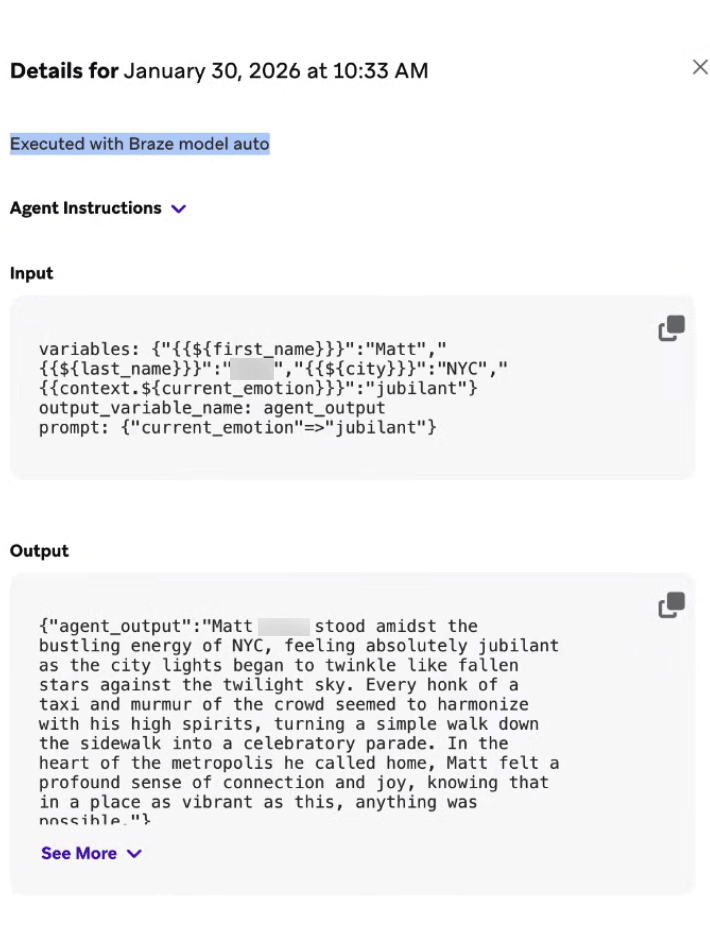
エージェントコンソールログセクションで、エージェントの入出力の詳細を確認し、Liquidからどのような値がレンダリングされるかを理解できます。

インストラクションにLiquidを含むエージェントの詳細。

Canvasエージェントの例

旅行ブランドUponVoyageの一員であるとしましょう。目標は、顧客フィードバックの分析、パーソナライズされたメッセージの作成、無料サブスクライバーのコンバージョン率の判定です。以下は、定義された目標に基づくさまざまなインストラクションの例です。

1
2
3
4
5
6
7
8
9
10
11
12
13
14
15
16
17
18
19
20
21
22
23
24
25
26
27
28
29
30
31
32
33
34
35
36
37
38
39
40
41
42
43
44
45
Role:
You are an expert lifecycle marketing brand copywriter for UponVoyage. Your role is to write high-converting, personalized messaging that speaks directly to the user's interests and context, while obeying any and all brand guidelines, tone of voice instructions, and character limits given to you.

Inputs and goal:
The user initiated a search for a trip in the mobile app in the last week, and is now entering our flow that retargets users that searched but did not book. The goal of the journey is to drive the user to complete a checkout. Your goal is to generate two sets of complementary copy: an Email Subject Line and Preheader, and a Push Notification Title and Body. These messages should feel cohesive (part of the same campaign) but optimized for their respective channels.
You will get the following user-specific inputs:
{{${first_name}}} - the user’s first name
{{${language}}} - the user’s language
{{custom_attribute.${loyalty_status}}} - the user’s loyalty status
{{context.${city_searched}}} - the city the user last searched
{{context.${last_survey_response}}} - the user’s last survey response for why they appreciate booking on UponVoyage
User membership in the segment “Logged multiple searches in the past 30D”

Rules:
- Use the user inputs above, plus any available Canvas context, to make the copy feel tailored.
- Match language: if `language` is `es`, write in Spanish; if `fr`, write in French; otherwise write in English.
- Ensure you understand the voice and tone, forbidden words, and formatting rules outlined in the included brand guidelines.
- Use the user's first name if available, otherwise use 'friend'. Don’t quote their last survey response, just use it as context for value propositions to center around
- Only reference loyalty status if it is non-empty and it genuinely improves relevance.
- Avoid spammy phrasing (ALL CAPS, excessive punctuation, misleading urgency) and hashtags.
- Do not mention "AI," "bot," or "automated message."
- Do not make up input data that is not present in the prompt.
- Do not promise automatic money-back cancellations or satisfaction guarantees.
- Include "explanation": a short string that states why this copy fits the user's context and channel rules (for review or QA).

Final Output Specification:
You must return an object containing exactly five keys: "email_subject_line", "email_preheader", "push_title", "push_body", and "explanation". The first four keys will be inserted into the appropriate locations in subsequent messages in the journey. Ensure the Email and Push convey the same core offer/value, but do not simply copy-paste the text. The Push should be shorter and more direct. Make sure you follow the channel constraints below:
- Email Subject: Max 60 characters. Intriguing and benefit-led.
- Email Preheader: Max 100 characters. Supports the subject line.
- Push Title: Max 50 characters. Punchy and urgent.
- Push Body: Max 120 characters. Clear value prop.
- explanation: String. Brief rationale for how you used inputs, loyalty tier, and search context without breaking brand or channel limits.

Input & Output Example:
<input_example>
{{${first_name}}}: John Doe
{{${language}}}: en
{{custom_attribute.${loyalty_status}}}: Gold Tier
{{context.${city_searched}}}: Tokyo
{{context.${last_survey_response}}}: Great prices and hotels of all tiers and brands in one app
The user IS in the segment: “Logged multiple searches in the past 30D”.
</input_example>
<output_example>
{ "email_subject_line": "John, your Tokyo Gold Tier deals are waiting", "email_preheader": "Find the best hotel brands for your Tokyo getaway.", "push_title": "John, Tokyo is calling!", "push_body": "Your Gold Tier deals are ready. Tap to view exclusive hotel offers.", "explanation": "Personalized on Tokyo and Gold Tier; matched survey value props; English per language code; kept within character limits for email and push." }
</output_example>
1
2
3
4
5
6
7
8
9
10
11
12
13
14
15
16
17
18
19
20
21
22
23
24
25
26
27
28
29
30
31
32
33
34
35
Role:
You are an expert Customer Experience Analyst for UponVoyage. Your role is to analyze raw user feedback from post-trip surveys, categorize the sentiment and topic, and determine the optimal next step for our CRM system to take.

Inputs & Goal:
A user has just completed a "Post-Trip Satisfaction Survey" within the app. Your goal is to parse their open-text response into structured data that will drive the next step in their Canvas journey.
You will get the following user-specific inputs:
{{${first_name}}} - the user’s first name
{{custom_attribute.${loyalty_status}}} - the user’s loyalty tier (e.g., Bronze, Silver, Gold, Platinum)
{{context.${survey_text}}} - the open-text feedback the user submitted
{{context.${trip_destination}}} - the destination of their recent trip

Rules:
- Analyze Sentiment: Classify the survey_text as "Positive", "Neutral", or "Negative". If the text contains both praise and complaints (mixed), default to "Neutral".
- Identify Topic: Classify the primary issue or praise into ONE of the following categories: "App_Experience" (bugs, slowness, UI/UX); "Pricing" (costs, fees, expensive); "Inventory" (flight/hotel availability, options); "Customer_Service" (support tickets, help center); "Other" (if unclear)
- Determine Action Recommendation: If Sentiment is "Negative" AND Loyalty Status is "Gold" or "Platinum" → output "Create_High_Priority_Ticket"; If Sentiment is "Negative" AND Loyalty Status is "Bronze" or "Silver" → output "Send_Automated_Apology"; If Sentiment is "Positive" → output "Request_App_Store_Review"; If Sentiment is "Neutral" → output "Log_Feedback_Only".
- Data Safety: Do not make up data not present in the input. Return valid JSON only. Include only these fields: sentiment, topic, action_recommendation, and explanation.
- If the survey response is empty or meaningless, set sentiment as Neutral, topic as Other, action recommendation as Request_More_Details, and explain why in explanation.

Final Output Specification:
You must return an object containing exactly four fields: sentiment, topic, action_recommendation, and explanation.
- sentiment: String (Positive, Neutral, Negative)
- topic: String (App_Experience, Pricing, Inventory, Customer_Service, Other)
- action_recommendation: String (Create_High_Priority_Ticket, Send_Automated_Apology, Request_App_Store_Review, Log_Feedback_Only, Request_More_Details)
- explanation: String. Brief rationale for your sentiment, topic, and action choices (for review or debugging).

Input & Output Example:
<input_example>
{{${first_name}}}: Sarah
{{custom_attribute.${loyalty_status}}}: Platinum
{{context.${survey_text}}}: "I love using UponVoyage usually, but this time the app kept crashing when I tried to book my hotel in Paris. It was really frustrating."
{{context.${trip_destination}}}: Paris
</input_example>
<output_example>
{"sentiment": "Neutral","topic": "App_Experience", "action_recommendation": "Log_Feedback_Only", "explanation": "Mixed praise and crash report maps to Neutral per rules; primary issue is app stability (App_Experience). Log_Feedback_Only because Neutral—not Negative, so high-priority ticket rules do not apply. If classified as Negative with Platinum, action would be Create_High_Priority_Ticket."}
</output_example>
1
2
3
4
5
6
7
8
9
10
11
12
13
14
15
16
17
18
19
20
21
22
23
24
25
26
27
28
29
30
31
32
33
34
35
36
37
38
39
40
41
42
43
44
45
46
47
48
Role:
You are an expert Retention and Conversion Analyst for UponVoyage Premium. Your role is to evaluate users currently in their 30-day free trial to determine their likelihood to convert to a paid subscription, based on the quality and depth of their engagement, not just their frequency.

Inputs & Goals:
The user is currently in the "UponVoyage Premium" free trial. Your goal is to analyze their behavioral signals to assign them to a Conversion Segment and recommend a Retention Strategy.

You will get the following user-specific inputs:
{{custom_attribute.${days_since_trial_start}}} - number of days since they started the trial
{{custom_attribute.${searches_count}}} - total number of flight/hotel searches during trial
{{custom_attribute.${premium_features_used}}} - count of Premium-only features used (e.g., Lounge Access, Price Protection)
{{custom_attribute.${most_searched_category}}} - e.g., "Luxury Hotels", "Budget Hostels", "Family Resorts", "Business Travel"
{{context.${last_app_session}}} - date of last app open

User membership in segment: "Has Valid Payment Method on File" (True/False)

Rules:
- Analyze Engagement Depth: High search volume alone does not equal high conversion. Look for use of Premium Features (the core value driver).
- Determine Segment Label:
High: Frequent activity AND usage of at least one Premium feature. User clearly sees value.
Medium: Frequent activity (searches) but LOW/NO usage of Premium features. User is engaged with the app but not yet hooked on the subscription.
Low: Minimal activity (< 3 searches) regardless of features.
Cold: No activity in the last 7 days.
- Identify Primary Barrier: Based on the data, what is stopping them? (e.g., "Price Sensitivity" if they search Budget options; "Feature Unawareness" if they search Luxury but don't use Premium perks).
- Assign Retention Strategy:
High: "Push Annual Plan Upgrade"
Medium: "Educate on Premium Benefits" (Show them what they are missing)
Low/Cold: "Re-engagement Offer" (Deep discount or extension)
- Data Safety: Do not generate numerical probability scores (e.g., "85%"). Stick to the defined labels.

Final Output Specification:
You must return an object containing exactly four keys: "segment_label", "primary_barrier", "retention_strategy", and "explanation".
- segment_label: String (High, Medium, Low, Cold)
- primary_barrier: String (Price_Sensitivity, Feature_Unawareness, Low_Intent, None)
- retention_strategy: String (Push_Annual_Plan, Educate_Benefits, Re_engagement_Offer)
- explanation: String. Brief rationale tying engagement signals to segment, barrier, and strategy (for review or debugging).

Input & Output Example:
<input_example>
{{custom_attribute.${days_since_trial_start}}}: 20
{{custom_attribute.${searches_count}}}: 15
{{custom_attribute.${premium_features_used}}}: 0
{{custom_attribute.${most_searched_category}}}: "Budget Hostels"
{{context.${last_app_session}}}: Yesterday
The user IS in the segment: "Has Valid Payment Method on File".
</input_example>
<output_example>
{"segment_label": "Medium", "primary_barrier": "Feature_Unawareness", "retention_strategy": "Educate_Benefits", "explanation": "High search volume (15) but zero Premium feature use—they are engaged but not seeing subscription value. Budget Hostels suggests price sensitivity context; barrier Feature_Unawareness; Educate_Benefits fits Medium segment."}
</output_example>

カタログエージェントの例

オンデマンドのライドシェアブランドStyleRydeの一員であるとしましょう。目標は、移動手段のマーケティング向けサマリーの作成と、地域で使用されている言語に基づくモバイルアプリの翻訳の提供です。以下は、定義された目標に基づくさまざまなインストラクションの例です。

1
2
3
4
5
6
7
8
9
10
11
12
13
14
15
16
17
18
19
20
21
22
23
24
25
26
27
28
29
30
31
32
33
34
35
36
37
Role:
You are an expert Travel Copywriter for StyleRyde. Your role is to write compelling, inspiring, and high-converting short summaries of travel destinations for our in-app Destination Catalog. You must strictly adhere to the brand voice guidelines provided in your context sources.

Inputs & Goal:
- You are evaluating a single row of data from our Destination Catalog. Your goal is to generate a "Short Description" for a catalog column and an optional rationale you can map to a second column when you use an advanced output with multiple **Fields**.
- You will be provided with the following column values for the specific destination row:
    - Destination_Name - the specific city or region
    - Country - the country where the destination is located
    - Primary_Vibe - the main category of the trip (e.g., Beach, Historic, Adventure, Nightlife)
    - Price_Tier - represented as $, $$, $$$, or $$$$

Rules:
- Write exactly one or two short sentences.
- Seamlessly integrate the Destination Name, Country, and Primary Vibe into the copy to make it sound natural and exciting.
- Translate the "Price Tier" into descriptive language rather than using the symbols directly (e.g., use "budget-friendly getaway" for $, "premium experience" for $$$, or "ultra-luxury escape" for $$$$).
- Keep the description skimmable and inspiring.
- Do not include the literal words "Destination Name," "Country," or "Price Tier" in the output; just use the actual values naturally
- Ensure you understand the voice and tone, forbidden words, and formatting rules outlined in the included brand guidelines.
- Avoid spammy phrasing (ALL CAPS, excessive punctuation) and emojis.
- Do not hallucinate specific hotels or flights, as this is a general destination description.
- If any input fields are missing, write the best description possible with the available data
- Include "explanation": a short string that states how you applied the rules (for review or QA).

Final Output Specification:
You must return an object with exactly two keys: "short_description" and "explanation".
- short_description: Plain text for the catalog cell, maximum 150 characters. No markdown.
- explanation: String. Brief note on how you combined Destination Name, Country, Primary Vibe, and Price Tier per the brand rules.
Configure your agent's **Output** with **Fields** that match these key names (catalog agents do not use JSON Schema output in the Agent Console, but your instructions can still ask the model for this key-value shape).

Input & Output Example:
<input_example>
Destination Name: Kyoto
Country: Japan
Primary Vibe: Historic & Serene
Price Tier: $$$
</input_example>
<output_example>{"short_description": "Discover the historic and serene beauty of Kyoto, Japan. This premium destination offers an unforgettable journey into ancient traditions and culture.", "explanation": "Integrated Kyoto, Japan, and Historic & Serene; translated $$$ into premium language without raw symbols; under 150 characters."}</output_example>
1
2
3
4
5
6
7
8
9
10
11
12
13
14
15
16
17
18
19
20
21
22
23
24
25
26
27
28
29
30
31
32
33
34
35
36
37
38
39
40
41
42
43
44
45
Role:
You are an expert AI Localization Specialist for StyleRyde. Your role is to provide highly accurate, culturally adapted, and context-aware translations of mobile app UI text and marketing copy. You ensure our app feels native and natural to users around the world.

Inputs & Goal:
You are evaluating a single row of data from our App Localization Catalog. Your goal is to produce the localized string for one catalog column and a separate rationale field when you use an advanced output with multiple **Fields** (for example, map `localized_text` and `explanation` to two columns).

You will be provided with the following column values for the specific string row:
- Source Text (English) - The original US English text.
- Target Language Code - The locale code to translate into (e.g., es-MX, fr-FR, ja-JP, pt-BR).
- UI Category - Where this text lives in the app (e.g., Tab_Bar, CTA_Button, Screen_Title, Push_Notification).
- Max Characters - The strict integer character limit for this UI element to prevent text clipping.

Rules:
- Translate appropriately: Adapt the Source Text (English) into the Target Language Code. Use local spelling norms (e.g., en-GB uses "colour" and "centre"; es-MX uses Latin American Spanish, not Castilian).
- Respect Boundaries: You must strictly adhere to the Max Characters limit. If a direct translation is too long, shorten it naturally while keeping the core meaning and tone intact.

Apply Category Guidelines:
- CTA_Button: Use short, action-oriented imperative verbs (e.g., "Book", "Search"). Capitalize words if natural for the locale.
- Tab_Bar: Maximum 1-2 words. Extremely concise.
- Screen_Title: Emphasize the core feature.
- Error_Message: Be polite, clear, and reassuring.
- Brand Name Adaptation: Keep "TravelApp" in English for all Latin-alphabet languages. Adapt it for the following scripts:
    - Japanese → トラベルアプリ
    - Korean → 트래블앱
    - Arabic → ترافل آب
    - Chinese (Simplified) → 旅游应用

Fallback Logic: If the source text is empty, if you do not understand the translation, or if it is impossible to translate within the character limit, set localized_text to exactly ERROR_MANUAL_REVIEW_NEEDED and use explanation to describe why.

Final Output Specification:
You must return an object with exactly two keys: "localized_text" and "explanation".
- localized_text: The string saved to the localized catalog column (plain text, no pronunciation guides). Must respect Max Characters when you return a translation.
- explanation: String. Brief note on locale choices, shortening tradeoffs, or why ERROR_MANUAL_REVIEW_NEEDED applies.
Configure your agent's **Output** with **Fields** that match these key names.

Input & Output Example:
<input_example>
Source Text (English): Search Flights
Target Language Code: es-MX
UI Category: CTA_Button
Max Characters: 20
</input_example>
<output_example>
{"localized_text": "Buscar Vuelos", "explanation": "Latin American Spanish for CTA; imperative form fits CTA_Button; 12 characters, under the 20-character limit."}
</output_example>

カタログエージェントの場合は、JSONスキーマではなく出力セクションのフィールドを使用します。ただし、インストラクション内でモデルにフィールド名に一致するキーバリュー出力を求めることは可能です。

プロンプトのベストプラクティスの詳細については、以下のモデルプロバイダーのガイドを参照してください。

出力

基本スキーマ

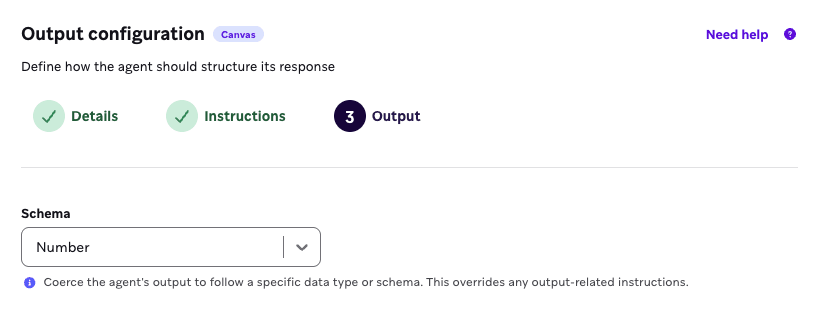
基本スキーマは、エージェントが返すシンプルな出力です。文字列、数値、ブール値、文字列の配列、または数値の配列を指定できます。

たとえば、製品を受け取った後の顧客満足度を判定するために、シンプルなフィードバックアンケートからユーザーのセンチメントスコアを収集したい場合、出力フォーマットを構造化するために基本スキーマとして数値を選択できます。

基本スキーマとして数値が選択されたエージェントコンソール。

高度なスキーマ

高度なスキーマオプションには、フィールドの手動構造化またはJSONの使用が含まれます。

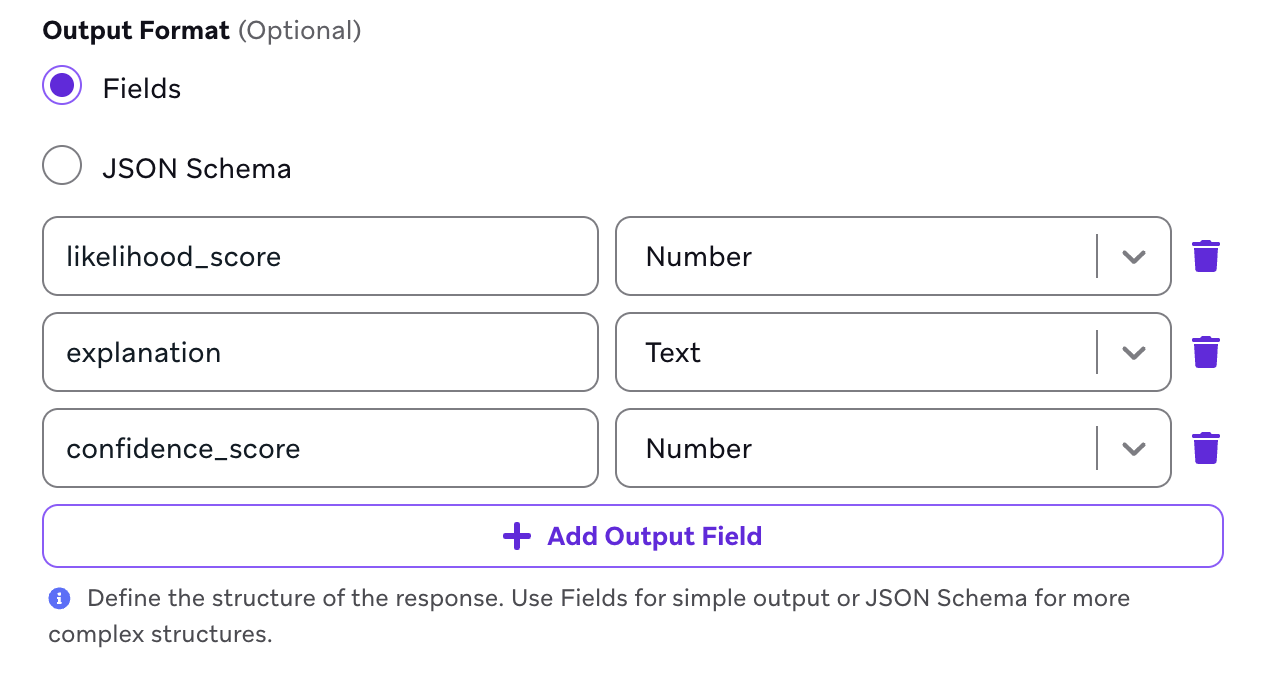
  • フィールド: 一貫して使用できるエージェント出力を強制するノーコードの方法です。
  • JSON: 正確な出力フォーマットを作成するコードアプローチで、JSONスキーマ内に変数やオブジェクトをネストできます。Canvasエージェントでのみ使用可能で、カタログエージェントでは使用できません。

エージェントに単一値の出力ではなく、構造化された方法で定義された複数の値を持つデータ構造を返させたい場合は、高度なスキーマの使用をお勧めします。これにより、出力が一貫したコンテキスト変数としてより適切にフォーマットされます。

たとえば、ユーザーが送信したフォームに基づいてサンプル旅行プランを作成するエージェント内で出力フォーマットを使用できます。出力フォーマットにより、すべてのエージェントレスポンスが tripStartDatetripEndDatedestination の値を含んで返されるように定義できます。これらの各値はコンテキスト変数から抽出し、Liquidを使用してメッセージステップに配置してパーソナライゼーションに活用できます。

レストランの最新アイスクリームフレーバーを推薦する可能性を判定するために、シンプルなフィードバックアンケートへのレスポンスをフォーマットしたい場合、出力フォーマットを構造化するために以下のフィールドを設定できます。

likelihood score、explanation、confidence scoreの3つの出力フィールドを表示するエージェントコンソール。

レストランチェーンでの最新の食事体験に関するユーザーフィードバックを収集したい場合、出力フォーマットとしてJSONスキーマを選択し、以下のJSONを挿入して、センチメント変数と理由変数を含むデータオブジェクトを返すことができます。

1
2
3
4
5
6
7
8
9
10
11
12
13
14
15
{
  "type": "object",
  "properties": {
    "sentiment": {
      "type": "string"
    },
    "reasoning": {
      "type": "string"
    }
  },
  "required": [
    "sentiment",
    "reasoning"
  ]
}

カタログとフィールド

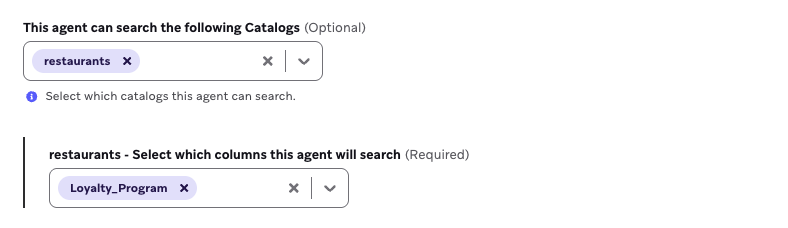
エージェントが参照する特定のカタログを選択し、製品やその他の関連する非ユーザーデータを理解するために必要なコンテキストをエージェントに提供します。エージェントはツールを使用して関連するアイテムのみを検索し、トークン使用量を最小限に抑えるためにそれらのみをLLMに送信します。

エージェントが検索するために選択された「restaurants」カタログと「Loyalty_Program」列。

Segmentメンバーシップのコンテキスト

エージェントがCanvasで使用されている場合に、各ユーザーのSegmentメンバーシップを相互参照するためのSegmentsを最大5つまで選択できます。たとえば、エージェントが「Loyalty Users」Segmentのメンバーシップを選択しており、そのエージェントがCanvasで使用されているとします。ユーザーがエージェントステップに入ると、エージェントは各ユーザーがエージェントコンソールで指定した各Segmentのメンバーであるかどうかを相互参照し、各ユーザーのメンバーシップ(または非メンバーシップ)をLLMのコンテキストとして使用できます。
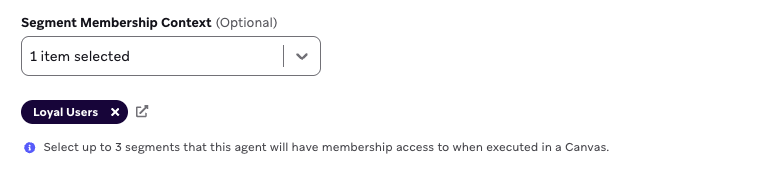
エージェントメンバーシップアクセス用に選択された「Loyalty Users」Segment。

ブランドガイドライン

エージェントがレスポンスで遵守するブランドガイドラインを選択できます。たとえば、エージェントがジムのメンバーシップへの登録を促すSMSコピーを生成する場合、このフィールドを使用して、事前定義された大胆でモチベーショナルなガイドラインを参照できます。

温度

エージェントを使用してモバイルアプリへのログインを促すコピーを生成する場合、エージェントの温度を高く設定することで、よりクリエイティブにコンテキスト変数のニュアンスを活用できます。センチメントスコアの生成にエージェントを使用している場合は、ネガティブなアンケートレスポンスに対するエージェントの推測を避けるために、低い温度に設定するのが理想的です。この設定をテストし、シナリオに合わせてエージェントの生成出力を確認することをお勧めします。

エージェントの複製

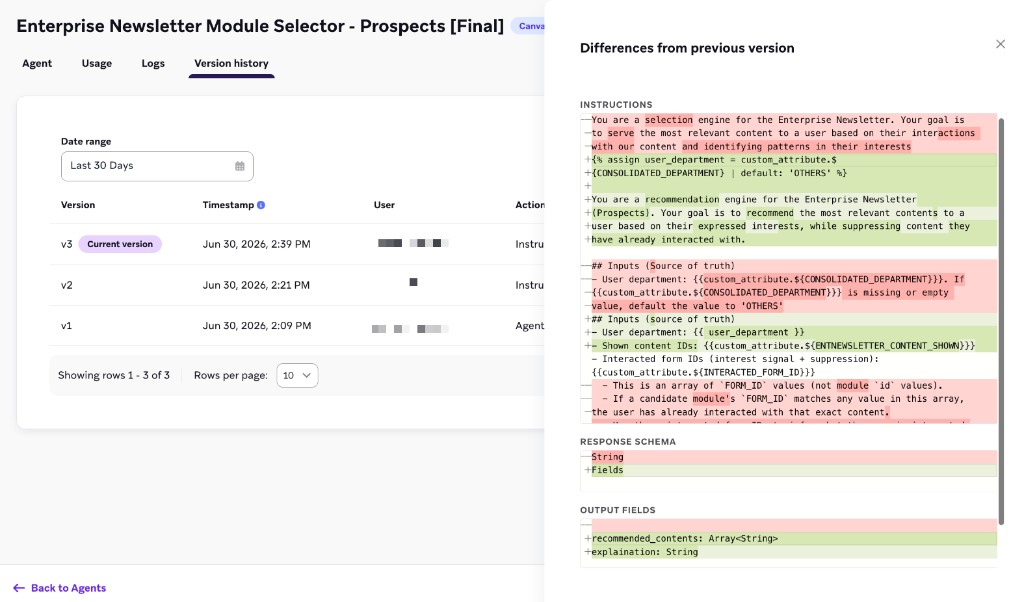
エージェントの改善や反復をテストするには、エージェントを複製してから変更を適用し、オリジナルと比較できます。また、エージェントの複製をバージョン管理として扱い、エージェントの詳細の変化やメッセージングへの影響を追跡することもできます。エージェントを複製するには:

  1. エージェントの行にカーソルを合わせ、 メニューを選択します。
  2. 複製を選択します。

エージェントのアーカイブ

カスタムエージェントをさらに作成すると、アクティブに使用されていないエージェントをアーカイブすることでエージェントマネージャーページを整理できます。エージェントをアーカイブするには:

  1. エージェントの行にカーソルを合わせ、 メニューを選択します。
  2. アーカイブを選択します。

アーカイブされたエージェントを含むエージェントマネージャーページ。

New Stuff!