プッシュ通知のディープリンク
Braze SDK のサイレントプッシュ通知を設定する方法について説明します。
前提条件
この機能を使用する前に、Android Braze SDKを統合する必要がある。
ユニバーサルデリゲートの作成
Android SDKは、Content Cards、アプリ内メッセージ、プッシュ通知にわたってBrazeによって開かれたすべてのディープリンクをカスタム処理するための単一のデリゲートオブジェクトを設定する機能を提供しています。
デリゲートオブジェクトはIBrazeDeeplinkHandlerインターフェイスを実装し、BrazeDeeplinkHandler.setBrazeDeeplinkHandler()を使用して設定する必要があります。ほとんどの場合、デリゲートはアプリのApplication.onCreate()で設定します。
以下は、カスタムインテントフラグとYouTube URLのカスタム動作でデフォルトのUriAction動作をオーバーライドする例です。
public class CustomDeeplinkHandler implements IBrazeDeeplinkHandler {
private static final String TAG = BrazeLogger.getBrazeLogTag(CustomDeeplinkHandler.class);
@Override
public void gotoUri(Context context, UriAction uriAction) {
String uri = uriAction.getUri().toString();
// Open YouTube URLs in the YouTube app and not our app
if (!StringUtils.isNullOrBlank(uri) && uri.contains("youtube.com")) {
uriAction.setUseWebView(false);
}
CustomUriAction customUriAction = new CustomUriAction(uriAction);
customUriAction.execute(context);
}
public static class CustomUriAction extends UriAction {
public CustomUriAction(@NonNull UriAction uriAction) {
super(uriAction);
}
@Override
protected void openUriWithActionView(Context context, Uri uri, Bundle extras) {
Intent intent = getActionViewIntent(context, uri, extras);
intent.setFlags(Intent.FLAG_ACTIVITY_NEW_TASK | Intent.FLAG_ACTIVITY_CLEAR_TOP | Intent.FLAG_ACTIVITY_SINGLE_TOP);
if (intent.resolveActivity(context.getPackageManager()) != null) {
context.startActivity(intent);
} else {
BrazeLogger.w(TAG, "Could not find appropriate activity to open for deep link " + uri + ".");
}
}
}
}
class CustomDeeplinkHandler : IBrazeDeeplinkHandler {
override fun gotoUri(context: Context, uriAction: UriAction) {
val uri = uriAction.uri.toString()
// Open YouTube URLs in the YouTube app and not our app
if (!StringUtils.isNullOrBlank(uri) && uri.contains("youtube.com")) {
uriAction.useWebView = false
}
val customUriAction = CustomUriAction(uriAction)
customUriAction.execute(context)
}
class CustomUriAction(uriAction: UriAction) : UriAction(uriAction) {
override fun openUriWithActionView(context: Context, uri: Uri, extras: Bundle) {
val intent = getActionViewIntent(context, uri, extras)
intent.flags = Intent.FLAG_ACTIVITY_NEW_TASK or Intent.FLAG_ACTIVITY_CLEAR_TOP or Intent.FLAG_ACTIVITY_SINGLE_TOP
if (intent.resolveActivity(context.packageManager) != null) {
context.startActivity(intent)
} else {
BrazeLogger.w(TAG, "Could not find appropriate activity to open for deep link $uri.")
}
}
}
companion object {
private val TAG = BrazeLogger.getBrazeLogTag(CustomDeeplinkHandler::class.java)
}
}
アプリ設定へのディープリンク
ディープリンクでアプリの設定を直接開けるようにするには、カスタムのBrazeDeeplinkHandlerが必要です。以下の例では、open_notification_pageというカスタムのキーと値のペアが存在する場合、ディープリンクがアプリの設定ページを開きます。
BrazeDeeplinkHandler.setBrazeDeeplinkHandler(new IBrazeDeeplinkHandler() {
@Override
public void gotoUri(Context context, UriAction uriAction) {
final Bundle extras = uriAction.getExtras();
if (extras.containsKey("open_notification_page")) {
Intent intent = new Intent();
intent.setAction("android.settings.APP_NOTIFICATION_SETTINGS");
intent.setFlags(Intent.FLAG_ACTIVITY_NEW_TASK);
//for Android 5-7
intent.putExtra("app_package", context.getPackageName());
intent.putExtra("app_uid", context.getApplicationInfo().uid);
// for Android 8 and later
intent.putExtra("android.provider.extra.APP_PACKAGE", context.getPackageName());
context.startActivity(intent);
}
}
});
BrazeDeeplinkHandler.setBrazeDeeplinkHandler(object : IBrazeDeeplinkHandler {
override fun gotoUri(context: Context, uriAction: UriAction) {
val extras = uriAction.extras
if (extras.containsKey("open_notification_page")) {
val intent = Intent()
intent.action = "android.settings.APP_NOTIFICATION_SETTINGS"
intent.flags = Intent.FLAG_ACTIVITY_NEW_TASK
//for Android 5-7
intent.putExtra("app_package", context.packageName)
intent.putExtra("app_uid", context.applicationInfo.uid)
// for Android 8 and later
intent.putExtra("android.provider.extra.APP_PACKAGE", context.packageName)
context.startActivity(intent)
}
}
})
WebViewアクティビティのカスタマイズ
Brazeがアプリ内でWebサイトのディープリンクを開く場合、そのディープリンクはBrazeWebViewActivityによって処理されます。

カスタムHTMLのアプリ内メッセージでは、target="_blank"が設定されたリンクはデバイスのデフォルトWebブラウザで開かれ、BrazeWebViewActivityでは処理されません。
これを変更するには、以下の手順を行います。
- キー
com.braze.Constants.BRAZE_WEBVIEW_URL_EXTRAでIntent.getExtras()からターゲットURLを処理する新しいアクティビティを作成します。例については、BrazeWebViewActivity.ktを参照してください。 - そのアクティビティを
AndroidManifest.xmlに追加し、exportedをfalseに設定します。<activity android:name=".MyCustomWebViewActivity" android:exported="false" />
- カスタムアクティビティを
BrazeConfigビルダーオブジェクトに設定します。ビルダーをビルドし、Application.onCreate()内でBraze.configure()に渡します。
BrazeConfig brazeConfig = new BrazeConfig.Builder()
.setCustomWebViewActivityClass(MyCustomWebViewActivity::class)
...
.build();
Braze.configure(this, brazeConfig);
val brazeConfig = BrazeConfig.Builder()
.setCustomWebViewActivityClass(MyCustomWebViewActivity::class.java)
...
.build()
Braze.configure(this, brazeConfig)
トラブルシューティング
プッシュ通知からのディープリンクがAndroidで動作しない場合は、以下のステップを試してください。
- Braze以外でディープリンクをテストします。 メールやブラウザなど、別のアプリからディープリンクURLを開いてみてください。アプリが開かない場合、
AndroidManifest.xmlでディープリンクが正しく設定されていない可能性があります。詳細については、AndroidのCreate Deep Linksドキュメントを参照してください。 - 自動ディープリンク処理が有効になっていることを確認します。
braze.xmlでcom_braze_handle_push_deep_links_automaticallyがtrueに設定されているか、ランタイム設定でこのオプションを設定しているか確認してください。この設定がないと、プッシュ通知をタップしたときにBrazeがアプリとディープリンクの送信先を自動的に開きません。 - ディープリンクハンドラーデリゲートを確認します。 カスタムの
IBrazeDeeplinkHandlerを設定している場合、gotoUriの実装がURIを正しく処理し、ドロップしていないことを確認してください。 - チャネル間でテストします。 同じディープリンクがアプリ内メッセージでは動作するがプッシュからは動作しない場合、問題はディープリンク自体ではなく、プッシュのディープリンク処理にある可能性が高いです。
Jetpack Composeの使用
Jetpack ComposeとNavHostを使用する際にディープリンクを処理するには、以下の手順を行います。
- ディープリンクを処理するアクティビティがAndroidマニフェストに登録されていることを確認します。
<activity ... <intent-filter> <action android:name="android.intent.action.VIEW" /> <category android:name="android.intent.category.BROWSABLE" /> <category android:name="android.intent.category.DEFAULT" /> <data android:host="articles" android:scheme="myapp" /> </intent-filter> </activity>
- NavHostで、処理するディープリンクを指定します。
composableWithCompositionLocal( route = "YOUR_ROUTE_HERE", deepLinks = listOf(navDeepLink { uriPattern = "myapp://articles/{${MainDestinations.ARTICLE_ID_KEY}}" }), arguments = listOf( navArgument(MainDestinations.ARTICLE_ID_KEY) { type = NavType.LongType } ), ) { backStackEntry -> val arguments = requireNotNull(backStackEntry.arguments) val articleId = arguments.getLong(MainDestinations.ARTICLE_ID_KEY) ArticleDetail( articleId ) }
- アプリのアーキテクチャによっては、現在のアクティビティに送信される新しいインテントも処理する必要がある場合があります。
DisposableEffect(Unit) { val listener = Consumer<Intent> { navHostController.handleDeepLink(it) } addOnNewIntentListener(listener) onDispose { removeOnNewIntentListener(listener) } }
前提条件
この機能を使う前に、Swift Braze SDKを統合する必要がある。

カスタムスキームのディープリンク、ユニバーサルリンク、「アプリ内でWeb URLを開く」の選択方法については、iOSディープリンクガイドを参照してください。トラブルシューティングについては、ディープリンクのトラブルシューティングを参照してください。
ディープリンクの処理
ステップ1:スキームを登録する
ディープリンクを処理するには、Info.plistファイルにカスタムスキームを記述する必要があります。ナビゲーション構造はディクショナリの配列によって定義されます。これらの各ディクショナリには、文字列の配列が含まれています。
Xcodeを使用してInfo.plistファイルを編集します。
- 新しいキー
URL typesを追加します。Xcodeでは、これが自動的にItem 0というディクショナリを含む配列になります。 Item 0内に、キーURL identifierを追加します。カスタムスキームに値を設定します。Item 0内に、キーURL Schemesを追加します。これは、自動的にItem 0文字列を含む配列になります。URL Schemes»Item 0をカスタムスキームに設定します。
また、Info.plistファイルを直接編集する場合は、次の仕様に従うこともできます。
<key>CFBundleURLTypes</key>
<array>
<dict>
<key>CFBundleURLName</key>
<string>YOUR.SCHEME</string>
<key>CFBundleURLSchemes</key>
<array>
<string>YOUR.SCHEME</string>
</array>
</dict>
</array>
ステップ2:スキームの許可リストを追加する
LSApplicationQueriesSchemesキーをアプリのInfo.plistファイルに追加して、canOpenURL(_:)に渡すURLスキームを宣言する必要があります。この許可リストに含まれないスキームを呼び出そうとすると、デバイスのログにエラーが記録され、ディープリンクは開かれません。以下はこのエラーの例です。
<Warning>: -canOpenURL: failed for URL: "yourapp://deeplink" – error: "This app is not allowed to query for scheme yourapp"
たとえば、アプリ内メッセージをタップしたときにFacebookアプリが開かれるようにするには、アプリの許可リストにFacebookカスタムスキーム(fb)が含まれている必要があります。含まれていないと、ディープリンクが拒否されます。自分のアプリ内のページやビューに誘導するディープリンクでも、アプリのカスタムスキームがアプリのInfo.plistに含まれている必要があります。
以下は許可リストの例です。
<key>LSApplicationQueriesSchemes</key>
<array>
<string>myapp</string>
<string>fb</string>
<string>twitter</string>
</array>
詳細については、LSApplicationQueriesSchemesキーに関するAppleのドキュメントを参照してください。
ステップ3:ハンドラを実装する
Xcode 27以降でビルドされたアプリはUISceneライフサイクルの採用が必須となるため、iOSはカスタムスキームURLをAppDelegateではなくSceneDelegateのscene:openURLContexts:を通じて配信します。重要な引数はNSURLオブジェクトです。
func scene(_ scene: UIScene, openURLContexts URLContexts: Set<UIOpenURLContext>) {
guard let url = URLContexts.first?.url else { return }
let path = url.path
let query = url.query
// Insert your code here to take some action based upon the path and query.
}
- (void)scene:(UIScene *)scene openURLContexts:(NSSet<UIOpenURLContext *> *)URLContexts {
NSURL *url = URLContexts.allObjects.firstObject.URL;
NSString *path = [url path];
NSString *query = [url query];
// Insert your code here to take some action based upon the path and query.
}
アプリがまだUISceneライフサイクルを採用していない場合、iOSは代わりにAppDelegateのapplication:openURL:options:を呼び出します。
func application(_ app: UIApplication, open url: URL, options: [UIApplication.OpenURLOptionsKey : Any] = [:]) -> Bool {
let path = url.path
let query = url.query
// Insert your code here to take some action based upon the path and query.
return true
}
App Transport Security(ATS)
Appleの定義によれば、「App Transport Securityは、アプリとWebサービス間の接続のセキュリティを向上させる機能です。この機能は、安全な接続のベストプラクティスに準拠したデフォルトの接続要件で構成されています。アプリでこのデフォルト動作をオーバーライドして、トランスポートセキュリティを無効にできます。」
ATSはデフォルトで適用されます。すべての接続がHTTPSを使用し、TLS 1.2で暗号化され、前方秘匿性が確保される必要があります。詳細については、ATSを使用して接続するための要件を参照してください。Brazeによりエンドデバイスに提供されるすべての画像は、TLS 1.2をサポートし、ATSと互換性のあるコンテンツ配信ネットワーク(「CDN」)によって処理されます。
アプリケーションのInfo.plistで例外として明示的に指定されていない限り、これらの要件を満たさない接続は、以下のようなエラーで失敗します。
エラー例1:
CFNetwork SSLHandshake failed (-9801)
Error Domain=NSURLErrorDomain Code=-1200 "An SSL error has occurred, and a secure connection to the server cannot be made."
エラー例2:
NSURLSession/NSURLConnection HTTP load failed (kCFStreamErrorDomainSSL, -9802)
ATSコンプライアンスは、モバイルアプリ内で開かれたリンク(クリックされたリンクのデフォルト処理)に適用され、Webブラウザーから外部で開かれたサイトには適用されません。
ATSへの対応
ATSは次のいずれかの方法で処理できますが、ATSの要件に準拠することを推奨します。
Brazeの統合では、(アプリ内メッセージやプッシュキャンペーンなどから)ユーザーを誘導する既存のリンクがATSの要件を満たすようにすることで、ATS要件を満たすことができます。ATSの制限を回避する方法はありますが、リンクされたすべてのURLがATSに準拠するようにすることをお勧めします。Appleがアプリケーションのセキュリティをこれまで以上に重視していることを考えると、ATSの例外を許可する以下のアプローチがAppleによってサポートされる保証はありません。
特定のドメインやスキームのリンクのサブセットをATSルールの例外として処理することを許可できます。Brazeメッセージングチャネルで使用するすべてのリンクがATSに準拠しているか、例外として処理されている場合、Brazeの統合はATS要件を満たします。
ATSの例外としてドメインを追加するには、アプリのInfo.plistファイルに以下を追加します。
<key>NSAppTransportSecurity</key>
<dict>
<key>NSAllowsArbitraryLoads</key>
<true/>
<key>NSExceptionDomains</key>
<dict>
<key>example.com</key>
<dict>
<key>NSExceptionAllowsInsecureHTTPLoads</key>
<false/>
<key>NSIncludesSubdomains</key>
<true/>
</dict>
</dict>
</dict>
詳細については、App Transport Securityのキーに関するAppleの記事を参照してください。
ATSを完全に無効にできます。ただし、セキュリティ保護が失われることと、将来のiOSとの互換性の両方を考慮して、この方法は推奨されません。ATSを無効にするには、アプリのInfo.plistファイルに以下を挿入します。
<key>NSAppTransportSecurity</key>
<dict>
<key>NSAllowsArbitraryLoads</key>
<true/>
</dict>
URLのデコード
SDKでは、有効なURLを作成するためにリンクをパーセントエンコードします。適切な形式のURLで使用できないリンク文字(Unicode文字など)は、すべてパーセントエスケープされます。
エンコードされたリンクをデコードするには、StringプロパティremovingPercentEncodingを使用します。また、BrazeDelegate.braze(_:shouldOpenURL:)でtrueを返す必要があります。アプリによるURLの処理をトリガーするには、アクションの呼び出しが必要です。たとえば、ステップ3のscene:openURLContexts:ハンドラで以下のようにします。
func scene(_ scene: UIScene, openURLContexts URLContexts: Set<UIOpenURLContext>) {
guard let url = URLContexts.first?.url else { return }
let urlString = url.absoluteString.removingPercentEncoding
// Handle urlString
}
- (void)scene:(UIScene *)scene openURLContexts:(NSSet<UIOpenURLContext *> *)URLContexts {
NSURL *url = URLContexts.allObjects.firstObject.URL;
NSString *urlString = [url.absoluteString stringByRemovingPercentEncoding];
// Handle urlString
}
アプリ設定へのディープリンク
Brazeのプッシュ通知やアプリ内メッセージからUIApplicationOpenSettingsURLStringを活用して、ユーザーをアプリの設定画面にディープリンクできます。
ユーザーをアプリからiOS設定に移動させる手順は以下のとおりです。
- まず、アプリケーションがスキームベースのディープリンクまたはユニバーサルリンク用に設定されていることを確認します。
- 設定ページへのディープリンクのURI(
myapp://settingsやhttps://www.braze.com/settingsなど)を決定します。 - カスタムスキームベースのディープリンクを使用している場合は、
scene:openURLContexts:ハンドラに次のコードを追加します。
func scene(_ scene: UIScene, openURLContexts URLContexts: Set<UIOpenURLContext>) {
guard let path = URLContexts.first?.url.path else { return }
if (path == "settings") {
UIApplication.shared.openURL(URL(string:UIApplication.openSettingsURLString)!)
}
}
- (void)scene:(UIScene *)scene openURLContexts:(NSSet<UIOpenURLContext *> *)URLContexts {
NSString *path = [URLContexts.allObjects.firstObject.URL path];
if ([path isEqualToString:@"settings"]) {
NSURL *settingsURL = [NSURL URLWithString:UIApplicationOpenSettingsURLString];
[[UIApplication sharedApplication] openURL:settingsURL];
}
}
カスタマイズオプション
デフォルトWebViewのカスタマイズ
Braze.WebViewControllerクラスは、Webディープリンクに対して「アプリ内でWeb URLを開く」が選択されている場合に、SDKによって開かれるWeb URLを表示します。
Braze.WebViewControllerは、BrazeDelegate.braze(_:willPresentModalWithContext:)デリゲートメソッドを使用してカスタマイズできます。
リンク処理のカスタマイズ
BrazeDelegateプロトコルを使用して、ディープリンク、Web URL、ユニバーサルリンクなどのURLの処理をカスタマイズできます。Brazeの初期化中にデリゲートを設定するには、Brazeインスタンスにデリゲートオブジェクトを設定します。その後、URIを処理する前にBrazeがデリゲートのshouldOpenURL実装を呼び出します。
プッシュ通知やアプリ内メッセージでアプリ内でWeb URLを開くを使用すると、BrazeはBraze.URLContextでcontext.useWebView == trueを渡します。メッセージがシステムブラウザーでURLを開く場合、useWebViewはfalseになります。braze(_:shouldOpenURL:)でcontext.useWebViewを確認して、カスタム処理を分岐させます。たとえば、キャンペーンがアプリ内表示をリクエストした場合にのみアプリ内のWebViewControllerを開くことができます。
ユニバーサルリンク
Brazeでは、プッシュ通知、アプリ内メッセージ、Content Cardsでユニバーサルリンクがサポートされています。ユニバーサルリンクのサポートを有効にするには、configuration.forwardUniversalLinksをtrueに設定する必要があります。
有効にすると、BrazeはUISceneライフサイクルを採用しているアプリ(Xcode 27以降でビルドされたアプリでは必須)の場合はscene:continue:メソッドを介してSceneDelegateに、それ以外の場合はapplication:continueUserActivity:restorationHandler:を介してAppDelegateにユニバーサルリンクを転送します。
また、ユニバーサルリンクを処理するようアプリケーションを設定する必要があります。Appleのドキュメントを参照し、アプリケーションがユニバーサルリンクに関して正しく設定されていることを確認してください。

ユニバーサルリンクの転送には、アプリケーション権限へのアクセスが必要です。アプリケーションをシミュレーターで実行している場合、これらの権限は直接使用できず、ユニバーサルリンクはシステムハンドラに転送されません。
シミュレータービルドのサポートを追加するには、アプリケーションの.entitlementsファイルを_Copy Bundle Resources_ビルドフェーズに追加します。詳細については、forwardUniversalLinksのドキュメントを参照してください。
SDKでは、ドメインのapple-app-site-associationファイルに対してクエリは実行されません。ドメイン名のみを確認することで、ユニバーサルリンクと通常のURLを区別します。そのため、SDKでは関連ドメインのサポートごとにapple-app-site-associationで定義される除外ルールは考慮されません。
例
BrazeDelegate
以下はBrazeDelegateの使用例です。詳細については、Braze Swift SDKリファレンスを参照してください。
func braze(_ braze: Braze, shouldOpenURL context: Braze.URLContext) -> Bool {
if context.url.host == "MY-DOMAIN.com" {
// Custom handle link here
return false
}
// Let Braze handle links otherwise
return true
}
- (BOOL)braze:(Braze *)braze shouldOpenURL:(BRZURLContext *)context {
if ([[context.url.host lowercaseString] isEqualToString:@"MY-DOMAIN.com"]) {
// Custom handle link here
return NO;
}
// Let Braze handle links otherwise
return YES;
}
前提条件
Flutter iOSアプリにディープリンクを実装する前に、Info.plistファイルでURLスキームを設定してください。詳細については、iOSのディープリンクを参照してください。
Flutter Androidの場合、Dartレイヤーでディープリンクを処理するのであれば、ネイティブ側の追加設定は不要です。この記事で紹介する最小限の実装で、ほとんどのFlutterアプリには十分です。
Brazeのネイティブcom_braze_handle_push_deep_links_automaticallyフラグは、Androidではデフォルトでfalseに設定されています。braze.xmlでこれをtrueに設定しない場合、ユーザーがプッシュ通知をタップしても、push_openedイベントはDartリスナーに届きますが、アプリが自動的にフォアグラウンドに表示されたり、ディープリンク先にルーティングされたりしません。詳細については、ディープリンクを追加する(Android)を参照してください。
高度なネイティブレイヤーのリンク処理(カスタムIBrazeDeeplinkHandlerの実装など)が必要な場合は、Androidのディープリンクを参照してください。
ディープリンクの実装
ステップ1:Flutterの組み込みハンドリングを設定する
- Xcodeプロジェクトで、
Info.plistファイルを開きます。 - 新しいキーと値のペアを追加します。
- キーを
FlutterDeepLinkingEnabledに設定します。 - タイプを
Booleanに設定します。 - 値を
YESに設定します。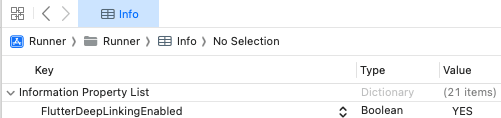
- Android Studioプロジェクトで、
AndroidManifest.xmlファイルを開きます。 activityタグ内の.MainActivityを見つけます。activityタグ内に、以下のmeta-dataタグを追加します。<meta-data android:name="flutter_deeplinking_enabled" android:value="true" />
ステップ2:Dartレイヤーにデータを転送する(オプション)
ネイティブ、ファーストパーティ、またはサードパーティのリンクハンドリングを使用して、ユーザーをアプリ内の特定の場所に誘導したり、特定の関数を呼び出したりするなどの複雑なユースケースに対応できます。
例:アラートダイアログへのディープリンク
以下の例は追加のパッケージに依存していませんが、同様のアプローチを使用してネイティブ、ファーストパーティ、またはサードパーティのパッケージ(go_routerなど)を実装できます。追加のDartコードが必要になる場合があります。
まず、ネイティブレイヤーでメソッドチャネルを使用して、ディープリンクのURL文字列データをDartレイヤーに転送します。
extension AppDelegate {
// Delegate method for handling custom scheme links.
override func application(_ app: UIApplication, open url: URL, options: [UIApplication.OpenURLOptionsKey : Any] = [:]) -> Bool {
forwardURL(url)
return true
}
// Delegate method for handling universal links.
override func application(_ application: UIApplication, continue userActivity: NSUserActivity, restorationHandler: @escaping ([UIUserActivityRestoring]?) -> Void) -> Bool {
guard userActivity.activityType == NSUserActivityTypeBrowsingWeb,
let url = userActivity.webpageURL else {
return false
}
forwardURL(url)
return true
}
private func forwardURL(_ url: URL) {
guard let controller: FlutterViewController = window?.rootViewController as? FlutterViewController else { return }
let deepLinkChannel = FlutterMethodChannel(name: "deepLinkChannel", binaryMessenger: controller.binaryMessenger)
deepLinkChannel.invokeMethod("receiveDeepLink", arguments: url.absoluteString)
}
}
class MainActivity : FlutterActivity() {
override fun onCreate(savedInstanceState: Bundle?) {
super.onCreate(savedInstanceState)
handleDeepLink(intent)
}
override fun onNewIntent(intent: Intent) {
super.onNewIntent(intent)
handleDeepLink(intent)
}
private fun handleDeepLink(intent: Intent) {
val binaryMessenger = flutterEngine?.dartExecutor?.binaryMessenger
if (intent?.action == Intent.ACTION_VIEW && binaryMessenger != null) {
MethodChannel(binaryMessenger, "deepLinkChannel")
.invokeMethod("receivedDeepLink", intent?.data.toString())
}
}
}
次に、Dartレイヤーでコールバック関数を使用して、前に送信されたURL文字列データを使用してアラートダイアログを表示します。
MethodChannel('deepLinkChannel').setMethodCallHandler((call) async {
deepLinkAlert(call.arguments, context);
});
void deepLinkAlert(String link, BuildContext context) {
showDialog(
context: context,
builder: (BuildContext context) {
return AlertDialog(
title: Text("Deep Link Alert"),
content: Text("Opened with deep link: $link"),
actions: <Widget>[
TextButton(
child: Text("Close"),
onPressed: () {
Navigator.of(context).pop();
},
),
],
);
},
);
}
前提条件
この機能を使う前に、Cordova Braze SDKを統合する必要がある。
プッシュディープリンクのイネーブルメント
デフォルトでは、Braze Cordova SDK は通知からのプッシュディープリンクを自動的に処理しない。プッシュディープリンクのイネーブルメントを行うには、プロジェクトのconfig.xmlAndroidManifest.xml ファイル内の <ANDROIDMANIFESTplatform>\ 要素に以下の設定を追加する。
<platform name="ios">
<preference name="com.braze.ios_forward_universal_links" value="YES" />
</platform>
<platform name="android">
    <preference name="com.braze.android_handle_push_deep_links_automatically" value="true" />
</platform>
ディープリンクが追跡された際のバックスタック動作をカスタマイズするには、以下のオプション設定を追加することもできる:
<platform name="android">
    <preference name="com.braze.android_handle_push_deep_links_automatically" value="true" />
    <preference name="com.braze.is_push_deep_link_back_stack_activity_enabled" value="true" />
    <preference name="com.braze.push_deep_link_back_stack_activity_class_name" value="YOUR_ACTIVITY_CLASS_NAME" />
</platform>
利用可能なプッシュ設定オプションの完全な一覧については、「オプション設定」を参照せよ。