AppboyKit(Objective-C SDKとも呼ばれます)はもはやサポートされておらず、Swift SDK. 新しい機能、バグ修正、セキュリティー更新s、またはテクニカルサポートを受けません。ただし、メッセージングと分析は通常どおり機能し続けます。詳しくは、新しいBrazeの概要SDK]を参照してください。
基本的なコンテンツカード開発者統合ガイドをお探しですか?それを見つけろ here.
コンテンツカード実装ガイド
このオプションおよび高度な実装ガイドでは、コンテンツカードコードの考慮事項、当社チームが作成した3つのカスタムユースケース、付随するコードスニペット、およびロギングインプレッション、クリック、および削除に関するガイダンスについて説明します。こちらから Braze Demo リポジトリにアクセスしてください!この実装ガイドは、Swift 実装を中心にしていますが、興味のある人のために Objective-C のスニペットが提供されていることに注意してください。
コードに関する考慮事項
カスタムオブジェクトとしてのコンテンツカード
ブースターを追加するロケット船のように、独自のカスタムオブジェクトを拡張してコンテンツカードとして機能させることができます。このような限定された API サーフェスは、異なるデータバックエンドとの互換性を保つ柔軟性を提供します。これは、ContentCardable プロトコルに準拠し、(次のコードスニペットに示すように) イニシャライザを実装することで実行できます。また、ContentCardData 構造体を使用することで、ABKContentCard データにアクセスできます。ABKContentCard ペイロードは、すべてプロトコルに付属のイニシャライザを使用して Dictionary 型から ContentCardData 構造体とカスタムオブジェクト自体を初期化するために使用されます。
イニシャライザには、ContentCardClassType enum も含まれます。この enum は、初期化するオブジェクトを決定するために使用されます。Braze ダッシュボード内のキーと値のペアを使用して、初期化するオブジェクトを決定するために使用する明示的な class_type キーを設定できます。コンテンツカードのこれらのキーと値のペアは、ABKContentCard の extras 変数に格納されます。イニシャライザのもう1つのコアコンポーネントは、metaData ディクショナリパラメータです。metaData には解析された ABKContentCard から一連のキーと値までのすべてが含まれます。関連するカードが解析され、カスタムオブジェクトに変換された後、アプリケーションは JSON またはその他のソースからインスタンス化されたかのように、それらのカードで作業を開始する準備ができています。
これらのコードに関する考慮事項をしっかりと理解したら、ユースケースをチェックして、カスタムオブジェクトの実装を開始します。
ContentCardable プロトコル
ContentCardData オブジェクト。ABKContentCard データと ContentCardClassType enum を表します。ABKContentCard メタデータを使用してカスタムオブジェクトをインスタンス化するために使用されるイニシャライザ。
1
2
3
4
5
6
7
8
9
10
11
12
13
14
15
16
17
18
19
20
21
22
protocol ContentCardable {
  var contentCardData: ContentCardData? { get }
  init?(metaData: [ContentCardKey: Any], classType contentCardClassType: ContentCardClassType)
}

extension ContentCardable {
  var isContentCard: Bool {
    return contentCardData != nil
  }

  func logContentCardClicked() {
    BrazeManager.shared.logContentCardClicked(idString: contentCardData?.contentCardId)
  }

  func logContentCardDismissed() {
    BrazeManager.shared.logContentCardDismissed(idString: contentCardData?.contentCardId)
  }

  func logContentCardImpression() {
    BrazeManager.shared.logContentCardImpression(idString: contentCardData?.contentCardId)
  }
}
コンテンツカードデータ構造体
ContentCardData は、ABKContentCard の解析された値を表します。
1
2
3
4
5
6
7
8
9
10
11
12
13
14
struct ContentCardData: Hashable {
  let contentCardId: String
  let contentCardClassType: ContentCardClassType
  let createdAt: Double
  let isDismissable: Bool
  ...
  // other Content Card properties such as expiresAt, pinned, etc.
}

extension ContentCardData: Equatable {
  static func ==(lhs: ContentCardData, rhs: ContentCardData) -> Bool {
    return lhs.contentCardId == rhs.contentCardId
  }
}
ContentCardable プロトコル
ABKContentCard メタデータを使用してカスタムオブジェクトをインスタンス化するために使用されるイニシャライザである ContentCardClassType enum と共に ABKContentCard データを表す ContentCardData オブジェクト。
1
2
3
4
5
6
7
8
9
10
11
12
@protocol ContentCardable <NSObject>

@property (nonatomic, strong) ContentCardData *contentCardData;
- (instancetype __nullable)initWithMetaData:(NSDictionary *)metaData
                                  classType:(enum ContentCardClassType)classType;

- (BOOL)isContentCard;
- (void)logContentCardImpression;
- (void)logContentCardClicked;
- (void)logContentCardDismissed;

@end
コンテンツカードデータ構造体
ContentCardData は、ABKContentCard の解析された値を表します。
1
2
3
4
5
6
7
8
9
10
11
12
13
14
15
16
@interface ContentCardData : NSObject

+ (ContentCardClassType)contentCardClassTypeForString:(NSString *)rawValue;

- (instancetype)initWithIdString:(NSString *)idString
                       classType:(ContentCardClassType)classType
                       createdAt:(double)createdAt isDismissible:(BOOL)isDismissible;

@property (nonatomic, readonly) NSString *contentCardId;
@property (nonatomic) ContentCardClassType classType;
@property (nonatomic, readonly) double *createdAt;
@property (nonatomic, readonly) BOOL isDismissible;
...
// other Content Card properties such as expiresAt, pinned, etc.

@end
カスタムオブジェクトイニシャライザ
ABKContentCard からの MetaData は、オブジェクトの変数を入力するために使用されます。Braze ダッシュボードで設定されたキーと値のペアは、「extras」ディクショナリに表示されます。
1
2
3
4
5
6
7
8
9
10
11
12
13
14
extension CustomObject: ContentCardable {
  init?(metaData: [ContentCardKey: Any], classType contentCardClassType: ContentCardClassType) {
    guard let idString = metaData[.idString] as? String,
      let createdAt = metaData[.created] as? Double,
      let isDismissable = metaData[.dismissable] as? Bool,
      let extras = metaData[.extras] as? [AnyHashable: Any],
      else { return nil }

    let contentCardData = ContentCardData(contentCardId: idString, contentCardClassType: contentCardClassType, createdAt: createdAt, isDismissable: isDismissable)
    let customObjectProperty = extras["YOUR-CUSTOM-OBJECT-PROPERTY"] as? String

    self.init(contentCardData: contentCardData, property: customObjectProperty)
  }
}
タイプの識別
ContentCardClassType enumは、Braze ダッシュボードの class_type 値を表します。この値は、コンテンツカードを別の場所に表示するためのフィルタ識別子としても使用されます。
1
2
3
4
5
6
7
8
9
10
11
12
13
14
15
16
17
18
enum ContentCardClassType: Hashable {
  case yourValue
  case yourOtherValue
  ...
  case none

  init(rawType: String?) {
    switch rawType?.lowercased() {
    case "your_value": // these values much match the value set in the Braze dashboard
      self = .yourValue
    case "your_other_value": // these values much match the value set in the Braze dashboard
      self = .yourOtherValue
    ...
    default:
      self = .none
    }
  }
}
カスタムオブジェクトイニシャライザ
ABKContentCard からの MetaData は、オブジェクトの変数を入力するために使用されます。Braze ダッシュボードで設定されたキーと値のペアは、「extras」ディクショナリに表示されます。
1
2
3
4
5
6
7
8
9
10
11
12
13
14
15
16
17
18
19
- (id _Nullable)initWithMetaData:(nonnull NSDictionary *)metaData classType:(enum ContentCardClassType)classType {
  self = [super init];
  if (self) {
    if ([metaData objectForKey:ContentCardKeyIdString] && [metaData objectForKey:ContentCardKeyCreated] && [metaData objectForKey:ContentCardKeyDismissible] && [metaData objectForKey:ContentCardKeyExtras]) {
      NSDictionary  *extras = metaData[ContentCardKeyExtras];
      NSString *idString = metaData[ContentCardKeyIdString];
      double createdAt = [metaData[ContentCardKeyCreated] doubleValue];
      BOOL isDismissible = metaData[ContentCardKeyDismissible];

      if ([extras objectForKey: @"YOUR-CUSTOM-PROPERTY")
        _customObjectProperty = extras[@"YOUR-CUSTOM-OBJECT-PROPERTY"];

      self.contentCardData = [[ContentCardData alloc] initWithIdString:idString classType:classType createdAt:createdAt isDismissible:isDismissible];

      return self;
    }
  }
  return nil;
}
タイプの識別
ContentCardClassType enumは、Braze ダッシュボードの class_type 値を表します。この値は、コンテンツカードを別の場所に表示するためのフィルタ識別子としても使用されます。
1
2
3
4
5
6
7
8
9
10
11
12
13
14
15
16
17
18
19
typedef NS_ENUM(NSInteger, ContentCardClassType) {
  ContentCardClassTypeNone = 0,
  ContentCardClassTypeYourValue,
  ContentCardClassTypeYourOtherValue,
  ...
};

+ (NSArray *)contentCardClassTypeArray {
  return @[ @"", @"your_value", @"your_other_value" ];
}

+ (ContentCardClassType)contentCardClassTypeForString:(NSString*)rawValue {
  if ([[self contentCardClassTypeArray] indexOfObject:rawValue] == NSNotFound) {
    return ContentCardClassTypeNone;
  } else {
    NSInteger value = [[self contentCardClassTypeArray] indexOfObject:rawValue];
    return (ContentCardClassType) value;
  }
}
コンテンツカードの要求
オブザーバがまだメモリ内に保持されている限り、Braze SDK からの通知コールバックが期待できます。
1
2
3
4
func loadContentCards() {
  BrazeManager.shared.addObserverForContentCards(observer: self, selector: #selector(contentCardsUpdated))
  BrazeManager.shared.requestContentCardsRefresh()
}
コンテンツカード SDK コールバックの処理
通知コールバックをヘルパーファイルに転送して、カスタムオブジェクトのペイロードデータを解析します。
1
2
3
4
5
@objc func contentCardsUpdated(_ notification: Notification) {
  guard let contentCards = BrazeManager.shared.handleContentCardsUpdated(notification, for: [.yourValue]) as? [CustomObject],!contentCards.isEmpty else { return }

 // do something with your array of custom objects
}
コンテンツカードの操作
class_type はフィルターとして渡され、一致する class_type を持つコンテンツカードのみを返します。
1
2
3
4
5
func handleContentCardsUpdated(_ notification: Notification, for classTypes: [ContentCardClassType]) -> [ContentCardable] {
  guard let updateIsSuccessful = notification.userInfo?[ABKContentCardsProcessedIsSuccessfulKey] as? Bool, updateIsSuccessful, let cards = contentCards else { return [] }

  return convertContentCards(cards, for: classTypes)
}
コンテンツカードの要求
オブザーバがまだメモリ内に保持されている限り、Braze SDK からの通知コールバックが期待できます。
1
2
3
4
- (void)loadContentCards {
  [[BrazeManager shared] addObserverForContentCards:self selector:@selector(contentCardsUpdated:)];
  [[BrazeManager shared] requestContentCardsRefresh];
}
コンテンツカード SDK コールバックの処理
通知コールバックをヘルパーファイルに転送して、カスタムオブジェクトのペイロードデータを解析します。
1
2
3
4
5
6
- (void)contentCardsUpdated:(NSNotification *)notification {
  NSArray *classTypes = @[@(ContentCardClassTypeYourValue)];
  NSArray *contentCards = [[BrazeManager shared] handleContentCardsUpdated:notification forClassTypes:classTypes];

  // do something with your array of custom objects
}
コンテンツカードの操作
class_type はフィルターとして渡され、一致する class_type を持つコンテンツカードのみを返します。
1
2
3
4
5
6
7
8
- (NSArray *)handleContentCardsUpdated:(NSNotification *)notification forClassType:(ContentCardClassType)classType {
  BOOL updateIsSuccessful = [notification.userInfo[ABKContentCardsProcessedIsSuccessfulKey] boolValue];
  if (updateIsSuccessful) {
    return [self convertContentCards:self.contentCards forClassType:classType];
  } else {
    return @[];
  }
}
ペイロードデータの使用
コンテンツカードの配列をループし、一致する class_type を持つカードのみを解析します。ABKContentCard からのペイロードは、Dictionary に解析されます。
1
2
3
4
5
6
7
8
9
10
11
12
13
14
15
16
17
18
19
20
21
22
23
24
25
26
27
28
29
30
31
32
33
34
35
36
37
func convertContentCards(_ cards: [ABKContentCard], for classTypes: [ContentCardClassType]) -> [ContentCardable] {
  var contentCardables: [ContentCardable] = []

  for card in cards {
    let classTypeString = card.extras?[ContentCardKey.classType.rawValue] as? String
    let classType = ContentCardClassType(rawType: classTypeString)
    guard classTypes.contains(classType) else { continue }

    var metaData: [ContentCardKey: Any] = [:]
    switch card {
    case let banner as ABKBannerContentCard:
      metaData[.image] = banner.image
    case let captioned as ABKCaptionedImageContentCard:
      metaData[.title] = captioned.title
      metaData[.cardDescription] = captioned.cardDescription
      metaData[.image] = captioned.image
    case let classic as ABKClassicContentCard:
      metaData[.title] = classic.title
      metaData[.cardDescription] = classic.cardDescription
    default:
      break
    }

    metaData[.idString] = card.idString
    metaData[.created] = card.created
    metaData[.dismissible] = card.dismissible
    metaData[.urlString] = card.urlString
    metaData[.extras] = card.extras
    ...
    // other Content Card properties such as expiresAt, pinned, etc.

    if let contentCardable = contentCardable(with: metaData, for: classType) {
      contentCardables.append(contentCardable)
    }
  }
  return contentCardables
}
コンテンツカードペイロードデータからのカスタムオブジェクトの初期化
class_type は、ペイロードデータから初期化されるカスタムオブジェクトを決定するために使用されます。
1
2
3
4
5
6
7
8
9
10
11
func contentCardable(with metaData: [ContentCardKey: Any], for classType: ContentCardClassType) -> ContentCardable? {
  switch classType {
  case .yourValue:
    return CustomObject(metaData: metaData, classType: classType)
  case .yourOtherValue:
    return OtherCustomObject(metaData: metaData, classType: classType)
  ...
  default:
    return nil
  }
}
ペイロードデータの使用
コンテンツカードの配列をループし、一致する class_type を持つカードのみを解析します。ABKContentCard からのペイロードは、Dictionary に解析されます。
1
2
3
4
5
6
7
8
9
10
11
12
13
14
15
16
17
18
19
20
21
22
23
24
25
26
27
28
29
30
31
32
33
34
35
36
37
- (NSArray *)convertContentCards:(NSArray<ABKContentCard*> *)cards forClassType:(ContentCardClassType)classType {
  NSMutableArray *contentCardables = [[NSMutableArray alloc] init];      for (ABKContentCard *card in cards) {
    NSString *classTypeString = [card.extras objectForKey:ContentCardKeyClassType];
    ContentCardClassType cardClassType = [ContentCardData contentCardClassTypeForString: classTypeString];
    if (cardClassType != classType) { continue; }

    NSMutableDictionary *metaData = [[NSMutableDictionary alloc] init];
    if ([card isKindOfClass:[ABKBannerContentCard class]]) {
      ABKBannerContentCard *banner = (ABKBannerContentCard *)card;
      metaData[ContentCardKeyImage] = banner.image;
    } else if ([card isKindOfClass:[ABKCaptionedImageContentCard class]]) {
      ABKCaptionedImageContentCard *captioned = (ABKCaptionedImageContentCard *)card;
      metaData[ContentCardKeyTitle] = captioned.title;
      metaData[ContentCardKeyCardDescription] = captioned.cardDescription;
      metaData[ContentCardKeyImage] = captioned.image;
    } else if ([card isKindOfClass:[ABKClassicContentCard class]]) {
      ABKClassicContentCard *classic = (ABKClassicContentCard *)card;
      metaData[ContentCardKeyCardDescription] = classic.title;
      metaData[ContentCardKeyImage] = classic.image;
    }

    metaData[ContentCardKeyIdString] = card.idString;
    metaData[ContentCardKeyCreated] = [NSNumber numberWithDouble:card.created];
    metaData[ContentCardKeyDismissible] = [NSNumber numberWithBool:card.dismissible];
    metaData[ContentCardKeyUrlString] = card.urlString;
    metaData[ContentCardKeyExtras] = card.extras;
    ...
    // other Content Card properties such as expiresAt, pinned, etc.

    id<ContentCardable> contentCardable = [self contentCardableWithMetaData:metaData forClassType:classType];
    if (contentCardable) {
      [contentCardables addObject:contentCardable];
    }
  }

  return contentCardables;
}
コンテンツカードペイロードデータからのカスタムオブジェクトの初期化
class_type は、ペイロードデータから初期化されるカスタムオブジェクトを決定するために使用されます。
1
2
3
4
5
6
7
8
9
10
11
- (id<ContentCardable>)contentCardableWithMetaData:(NSDictionary *)metaData forClassType:(ContentCardClassType)classType {
  switch (classType) {
    case ContentCardClassTypeYourValue:
      return [[CustomObject alloc] initWithMetaData:metaData classType:classType];
    case ContentCardClassTypeYourOtherValue:
      return nil;
    ...
    default:
      return nil;
  }
}
ユースケース
以下に3つのユースケースを紹介する。各ユースケースでは、詳細な説明、関連するコードスニペット、およびコンテンツカード変数が Braze ダッシュボードでどのように表示され、どのように使用されるかを確認できます。
補足コンテンツとしてのコンテンツカード
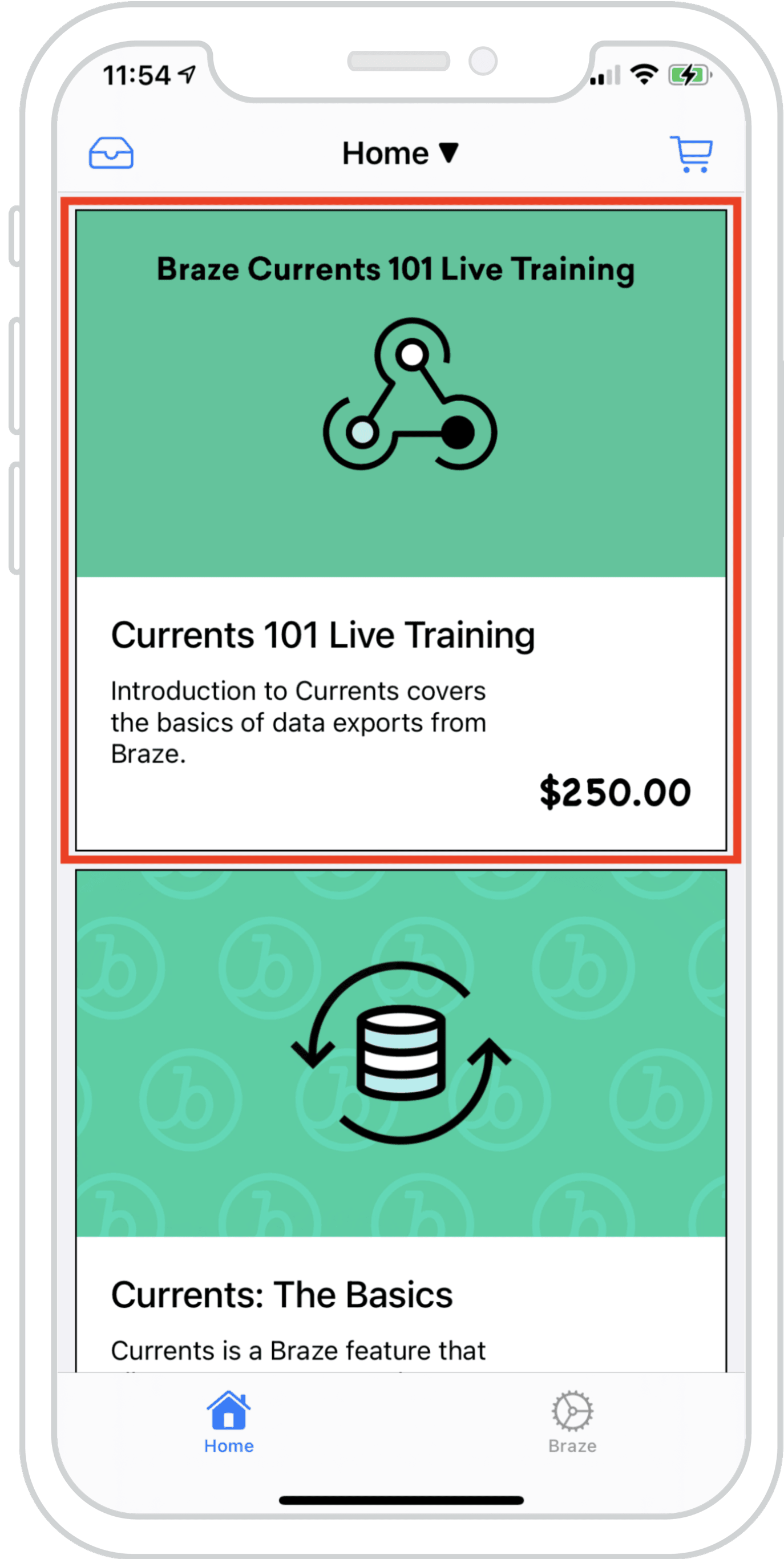
コンテンツカードを既存のフィードにシームレスにブレンドし、複数のフィードからのデータを同時に読み込むことができます。これにより、Braze コンテンツカードと既存のフィードコンテンツとの一体感のある、調和のとれた体験が生まれます。
右の例は、ローカルデータと Braze を使用したコンテンツカードによって設定された項目のハイブリッドリストを含む UICollectionView を示しています。これにより、既存のコンテンツとコンテンツカードを区別できなくなります。
ダッシュボード設定
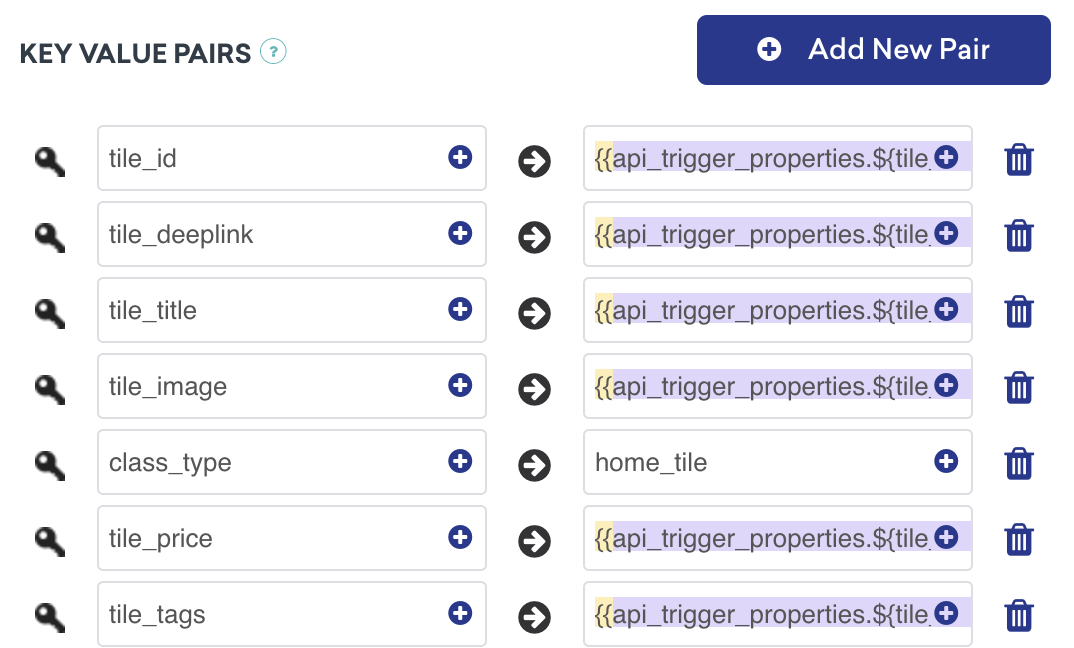
このコンテンツカードは、API トリガーのキーと値のペアを持つ API トリガーキャンペーンによって提供されます。これは、カードの値が外部要因に依存して、ユーザに表示するコンテンツを決定するキャンペーンに最適です。なお、class_typeはセットアップ時に知っておく必要があります。
分析をログに記録する準備ができましたか?
以下のセクションを参照して、データフローの外観について理解を深めてください。
メッセージセンターのコンテンツカード
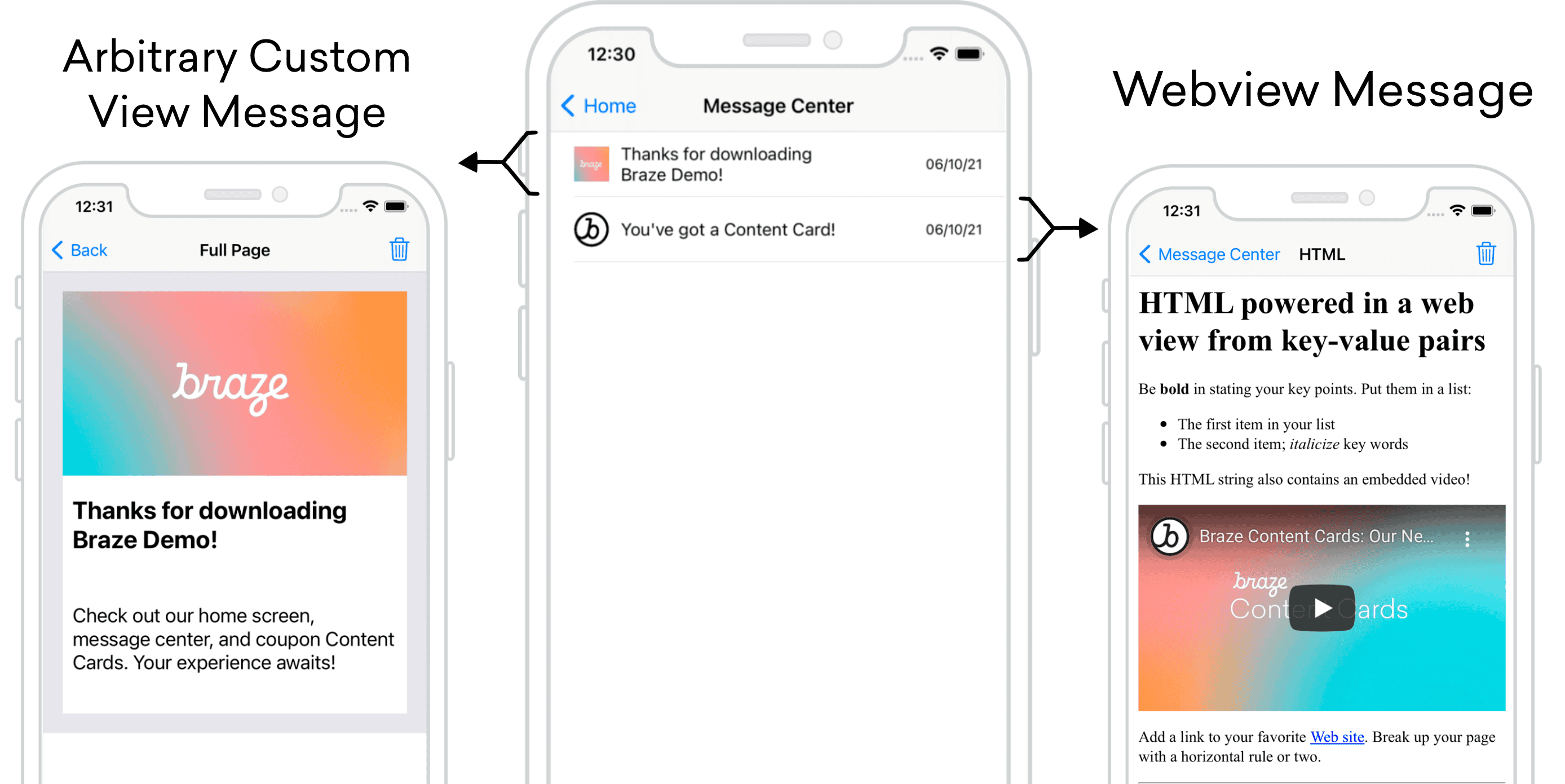
コンテンツカードは、各メッセージが独自のカードであるメッセージセンター形式で使用できます。メッセージセンター内の各メッセージは、コンテンツカードペイロードを介して入力され、各カードには、クリック時 UI/UX を起動する追加のキーと値のペアが含まれています。次の例では、1つのメッセージによって任意のカスタムビューが表示され、別のメッセージによってカスタム HTML を表示する Web ビューが開きます。
ダッシュボード設定
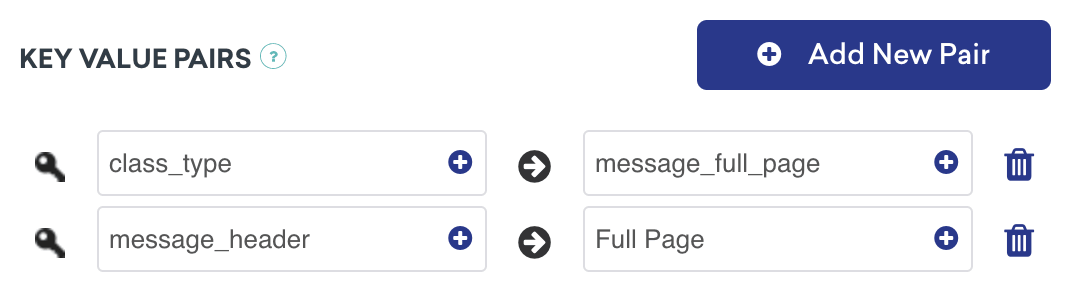
次のメッセージタイプでは、キーと値のペア class_type をダッシュボード設定に追加する必要があります。ここで割り当てる値は任意ですが、クラス型を区別できるようにする必要があります。これらのキーと値のペアは、ユーザーが簡略化された受信トレイメッセージをクリック際に行き先を決定するときにアプリケーションが参照するキー識別子です。
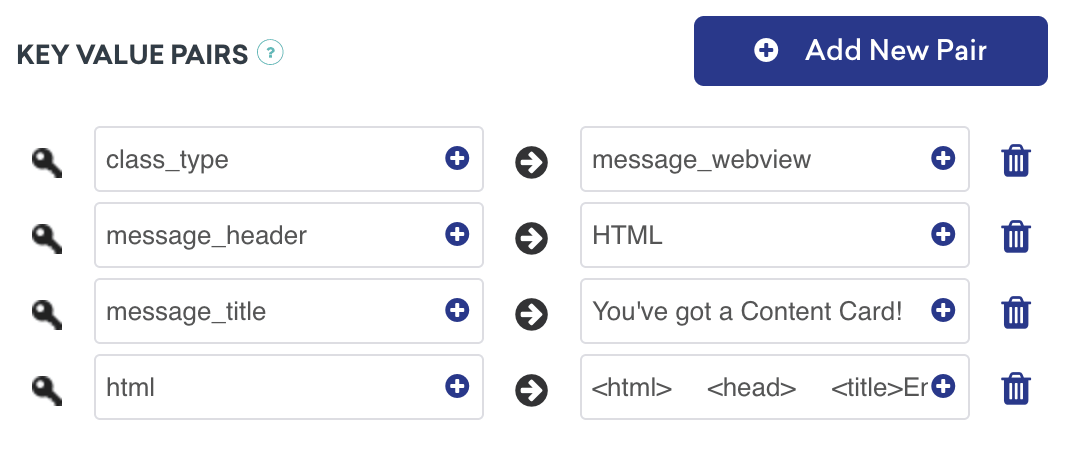
詳細説明
メッセージセンターロジックは、Braze のキーと値のペアによって提供される contentCardClassType によって駆動されます。addContentCardToViewメソッドを使用すると、これらのクラス型をフィルタリングして識別することができます。
クリック時の動作に class_type を使用する
メッセージをクリックすると、ContentCardClassType が次の画面の入力方法を制御します。
1
2
3
4
5
6
7
8
9
10
func addContentCardToView(with message: Message) {
    switch message.contentCardData?.contentCardClassType {
      case .message(.fullPage):
        loadContentCardFullPageView(with: message as! FullPageMessage)
      case .message(.webView):
        loadContentCardWebView(with: message as! WebViewMessage)
      default:
        break
    }
}
クリック時の動作に class_type を使用する
メッセージをクリックすると、ContentCardClassType が次の画面の入力方法を制御します。
1
2
3
4
5
6
7
8
9
10
11
12
- (void)addContentCardToView:(Message *)message {
  switch (message.contentCardData.classType) {
    case ContentCardClassTypeMessageFullPage:
      [self loadContentCardFullPageView:(FullPageMessage *)message];
      break;
    case ContentCardClassTypeMessageWebview:
      [self loadContentCardWebView:(WebViewMessage *)message];
      break;
    default:
      break;
  }
}
分析をログに記録する準備ができましたか?
以下のセクションを参照して、データのフローがどうあるべきかを理解してください。
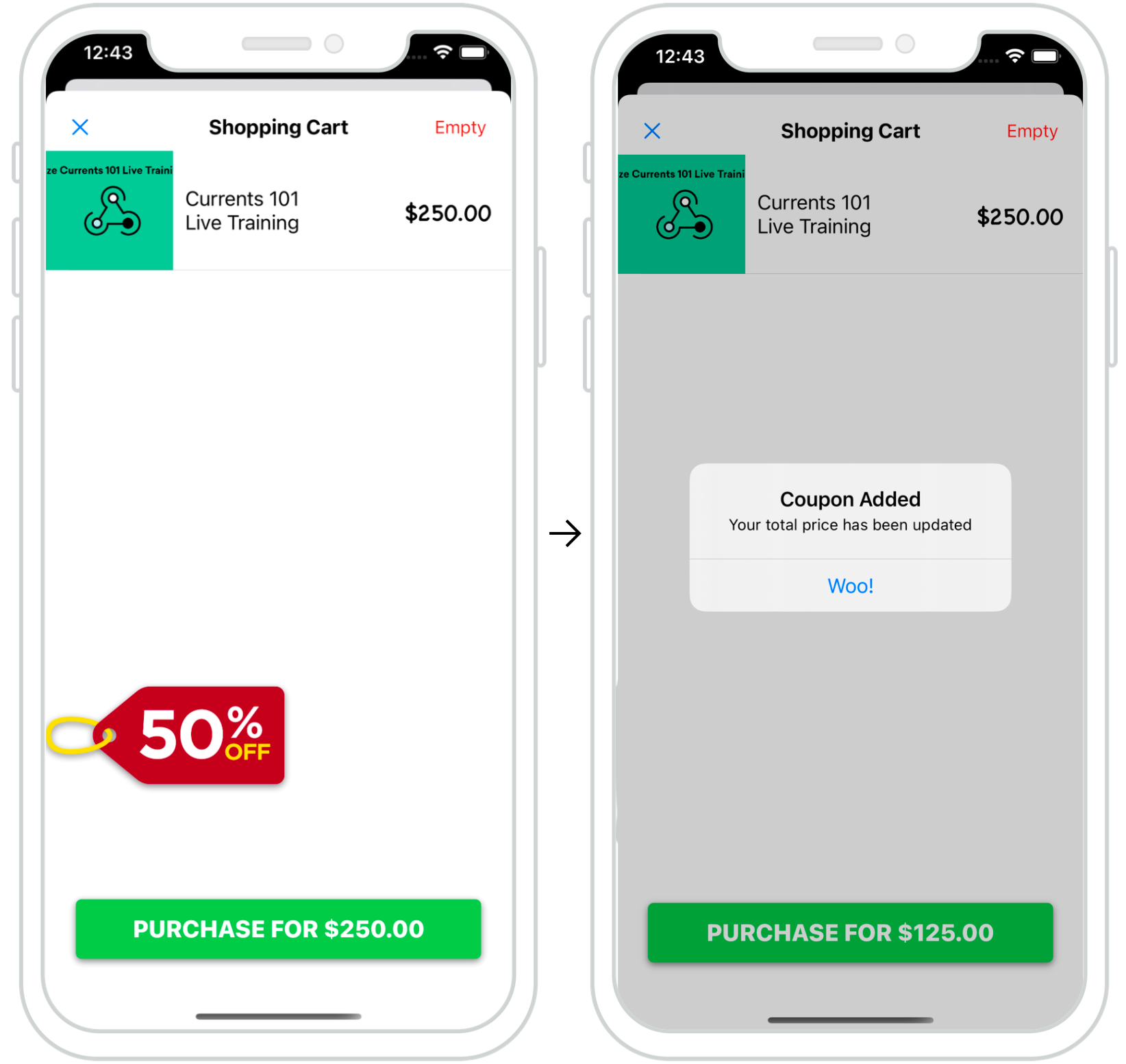
インタラクティブコンテンツカード
コンテンツカードを活用して、ユーザーのための動的でインタラクティブな体験を作成できます。右の例では、コンテンツカードのポップアップがチェックアウト時に表示され、ユーザーに最新のプロモーションを提供しています。
このように適切に配置されたカードは、ユーザーが特定のユーザーアクションを実行するように「後押し」する優れた方法です。
ダッシュボード設定
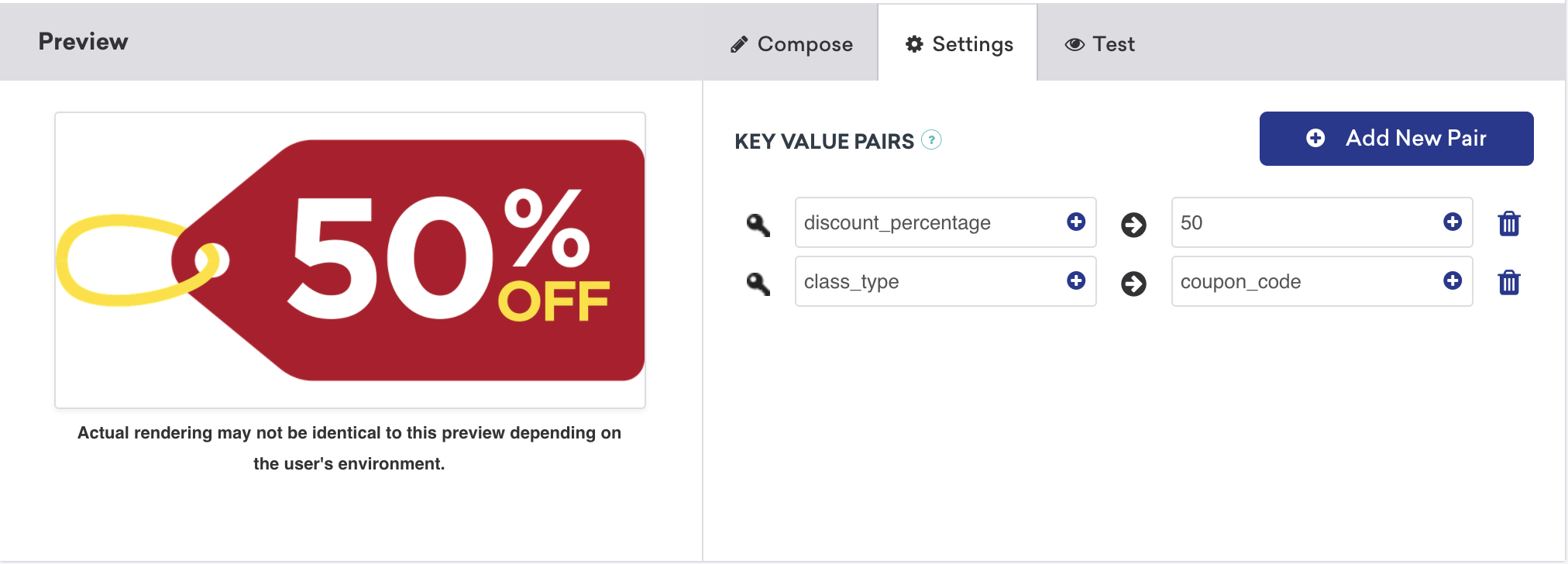
インタラクティブコンテンツカードのダッシュボード設定は簡単です。このユースケースのキーと値のペアには、希望する割引額として設定された discount_percentage と、coupon_code として設定された class_type があります。これらのキーと値のペアは、タイプ固有のコンテンツカードがどのようにフィルタリングされ、チェックアウト画面に表示される方法です。
分析をログに記録する準備ができましたか?
以下のセクションを参照して、データフローの外観について理解を深めてください。
ダークモードのカスタマイズ
デフォルトでは、コンテンツカードビューは、テーマカラーのセットでデバイスのダークモードの変更に自動的に応答します。
この動作は、カスタムスタイルガイドで詳細に説明されているようにオーバーライドできます。
インプレッション、クリック、却下の記録
カスタムオブジェクトをコンテンツカードとして機能するように拡張した後は、インプレッション、クリック、および却下などの貴重なメトリクスのロギングが迅速に行われます。これは、ContentCardableプロトコルを使用して実行できます。このプロトコルは、Braze SDK によってロギングされるヘルパーファイルを参照し、データを提供します。
実装コンポーネント
ロギングアナリティック
ロギングメソッドは、ContentCardable プロトコルに準拠するオブジェクトから直接呼び出すことができます。
1
2
3
customObject.logContentCardImpression()
customObject.logContentCardClicked()
customObject.logContentCardDismissed()
ABKContentCard を取得する
カスタムオブジェクトから渡された idString は、関連付けられたコンテンツカードを識別して分析をログに記録するために使用されます。
1
2
3
4
5
6
7
8
9
10
11
extension BrazeManager {
  func logContentCardImpression(idString: String?) {
    guard let contentCard = getContentCard(forString: idString) else { return }

    contentCard.logContentCardImpression()
  }

  private func getContentCard(forString idString: String?) -> ABKContentCard? {
    return contentCards?.first(where: { $0.idString == idString })
  }
}
ロギングアナリティック
ロギングメソッドは、ContentCardable プロトコルに準拠するオブジェクトから直接呼び出すことができます。
1
2
3
[customObject logContentCardImpression];
[customObject logContentCardClicked];
[customObject logContentCardDismissed];
ABKContentCard を取得する
カスタムオブジェクトから渡された idString は、関連付けられたコンテンツカードを識別して分析をログに記録するために使用されます。
1
2
3
4
5
6
7
8
9
10
11
- (void)logContentCardImpression:(NSString *)idString {
  ABKContentCard *contentCard = [self getContentCard:idString];
  [contentCard logContentCardImpression];
}

- (ABKContentCard *)getContentCard:(NSString *)idString {
  NSPredicate *predicate = [NSPredicate predicateWithFormat:@"self.idString == %@", idString];
  NSArray *filteredArray = [self.contentCards filteredArrayUsingPredicate:predicate];

  return filteredArray.firstObject;
}
コントロールバリアントのコンテンツカードの場合、カスタムオブジェクトはインスタンス化されたままで、UI ロジックはオブジェクトの対応するビューを非表示に設定する必要があります。その後、オブジェクトはインプレッションをログに記録して、ユーザーがいつコントロールカードを表示したかを分析に知らせることができます。
ヘルパーファイル
ContentCardKey helper file
1
2
3
4
5
6
7
8
enum ContentCardKey: String {
  case idString
  case created
  case classType = "class_type"
  case dismissible
  case extras
  ...
}
1
2
3
4
5
6
static NSString *const ContentCardKeyIdString = @"idString";
static NSString *const ContentCardKeyCreated = @"created";
static NSString *const ContentCardKeyClassType = @"class_type";
static NSString *const ContentCardKeyDismissible = @"dismissible";
static NSString *const ContentCardKeyExtras = @"extras";
...
 GitHub でこのページを編集