バナー配置を管理する
Braze SDKでバナー配置の作成と管理方法を学びます。配置固有のプロパティへのアクセスやインプレッションの記録についても説明します。一般的な情報については、バナーについてを参照してください。
配置リクエストについて
アプリやWebサイトで配置を作成すると、アプリは各配置に対応するバナーメッセージを取得するため、Brazeにリクエストを送信します。
- 1回の更新リクエストにつき、最大10件の配置をリクエストできます。
- 各配置において、Brazeはユーザーが受け取る資格のある最高優先度のバナーを返します。
- リフレッシュ時に10件を超える配置がリクエストされた場合、最初の10件のみが返され、残りは破棄されます。
例えば、アプリがリフレッシュリクエストで3つの配置をリクエストする場合があります:homepage_promo、cart_abandonment、およびseasonal_offer。各リクエストは、その配置に対して最も関連性の高いバナーを返します。
更新リクエストのレート制限
古いSDKバージョン(SWIFT 13.1.0以前、Android 38.0.0以前、Web 6.1.0以前、React Native 17.0.0以前、Flutter 15.0.0以前)を使用している場合、ユーザーセッションごとにリフレッシュリクエストは1回のみ許可されます。
新しい最小SDKバージョン(SWIFT 13.1.0以上、Android 38.0.0以上、Web 6.1.0以上、React Native 17.0.0以上、Flutter 15.0.0以上)を使用している場合、リフレッシュリクエストは過剰なポーリングを防ぐためトークンバケットアルゴリズムで制御されます。
- 各ユーザーセッションは、5つのリフレッシュトークンから始まります。
- トークンは180秒(3分)ごとに1個補充されます。
requestBannersRefreshを明示的に呼び出すたびにトークンを1つ消費します。新しいセッションの開始時やchangeUserが呼び出された際に自動的に行われるリフレッシュはトークンを消費しません。これは、そのユーザーに対して最後にキャッシュされたバナーを配信するためです。トークンが利用できない状態で更新を試みると、SDKはリクエストを送信せず、トークンが補充されるまでエラーをログに記録します。これはセッション途中やイベントトリガーによる更新において重要です。ダイナミックな更新を実装する場合(例えば、ユーザーが同じページでアクションを完了した後など)、カスタムイベントが記録された後にリフレッシュメソッドを呼び出してください。ただし、ユーザーが別のバナーキャンペーンの対象となる前に、Brazeがイベントを取り込んで処理するのに必要な遅延がある点に注意してください。
配置を作成する
前提条件
バナー配置を作成するために必要な最小SDKバージョンは以下の通りです。
ステップ 1: Braze での配置の作成
まだ作成していない場合は、アプリまたはサイトでバナーを表示できる場所を定義するために使用するバナーの配置をBrazeで作成する必要があります。配置を作成するには、Settings > Banners Placementsに移動し、配置の作成を選択します。

配置に名前を付け、配置ID を割り当てます。ID はカードのライフサイクル全体で使用されるため、後で変更しないでください。ID を割り当てる前に、他のチームに相談してください。詳細については、配置IDを参照してください。
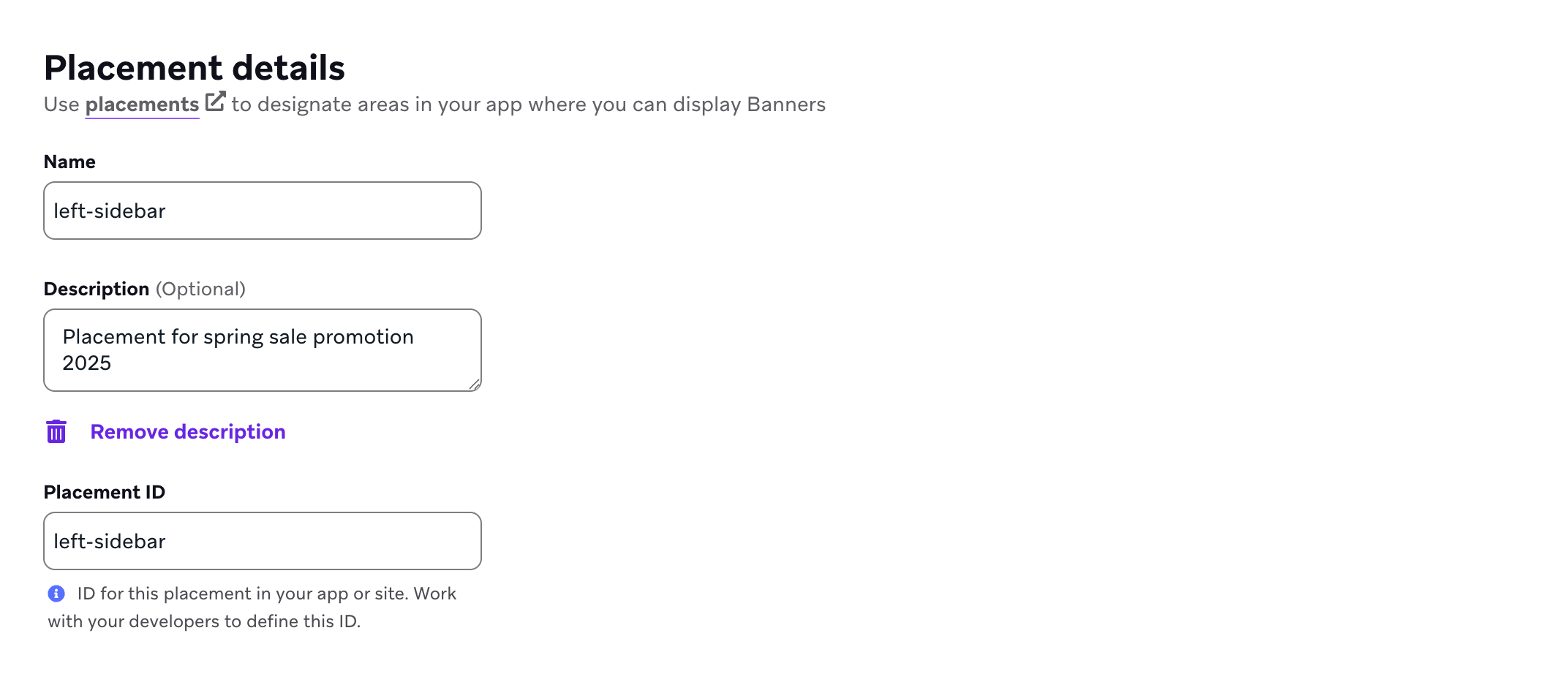
ステップ2:アプリの配置を更新する
配置を更新するには、SDKの更新メソッドを呼び出します(WebおよびAndroidではrequestBannersRefresh()、SwiftではrequestRefresh())。
バナーの更新動作には2つのパスがあります。
- 明示的な更新:アクティブなセッション中の任意のタイミングで更新メソッドを呼び出すことができます。
- 新しいセッションでの自動更新:少なくとも1回の明示的な更新リクエストを行った後、新しいBrazeセッションが開始されたとき(たとえば
changeUser()の後やセッションタイムアウト後)に、SDKは最後にリクエストされた配置IDを再リクエストできます。
subscribeToBannersUpdates()の役割はプラットフォームによって異なります。
- iOSおよびAndroid:
subscribeToBannersUpdates()(SwiftではsubscribeToUpdates())は更新コールバックを登録します。セッション開始時の自動更新は、サブスクリプションがアクティブかどうかに依存しません。 - Web:セッション開始時の自動更新は、
subscribeToBannersUpdates()が登録されていることに紐づいています。アクティブなサブスクリプションがない場合、SDKは新しいセッションで自動的に更新を繰り返しません。
いずれの場合も、アプリのライフサイクルごとに少なくとも1回の明示的な更新リクエストを行う必要があります。これにより、SDKがどの配置IDを更新し続けるべきかを把握できます。バナーは、最初の呼び出しなしに初回起動時に自動的にフェッチされることはなく、トラッキングされる配置IDはアプリの再起動後にリセットされます。
セッション開始時の自動更新はレート制限トークンを消費しません。

バナーのダウンロードや表示の遅延を避けるため、できるだけ早く配置を更新してください。
1
2
3
import * as braze from "@braze/web-sdk";

braze.requestBannersRefresh(["global_banner", "navigation_square_banner"]);
1
AppDelegate.braze?.banners.requestRefresh(placementIds: ["global_banner", "navigation_square_banner"])
1
2
3
4
ArrayList<String> listOfBanners = new ArrayList<>();
listOfBanners.add("global_banner");
listOfBanners.add("navigation_square_banner");
Braze.getInstance(context).requestBannersRefresh(listOfBanners);
1
Braze.getInstance(context).requestBannersRefresh(listOf("global_banner", "navigation_square_banner"))
1
Braze.requestBannersRefresh(["global_banner", "navigation_square_banner"]);
1
This feature is not currently supported on Unity.
1
This feature is not currently supported on Cordova.
1
braze.requestBannersRefresh(["global_banner", "navigation_square_banner"]);
1
This feature is not currently supported on Roku.
ステップ3:更新をリッスンする
このガイドのSDKメソッドを使ってバナーを挿入する場合、すべての分析イベント(インプレッションやクリックなど)は自動的に処理され、インプレッションはバナーが表示されているときのみ記録されます。
Web Braze SDKでvanilla JavaScriptを使用している場合、subscribeToBannersUpdatesを使って配置の更新をリッスンし、requestBannersRefreshを呼び出してフェッチします。
1
2
3
4
5
6
7
8
import * as braze from "@braze/web-sdk";

braze.subscribeToBannersUpdates((banners) => {
  console.log("Banners were updated");
});

// always refresh after your subscriber function has been registered
braze.requestBannersRefresh(["global_banner", "navigation_square_banner"]);
Web Braze SDKでReactを使用している場合、useEffectフック内でsubscribeToBannersUpdatesを設定し、リスナーを登録した後にrequestBannersRefreshを呼び出します。
1
2
3
4
5
6
7
8
9
10
11
12
13
14
15
import * as braze from "@braze/web-sdk";

useEffect(() => {
  const subscriptionId = braze.subscribeToBannersUpdates((banners) => {
    console.log("Banners were updated");
  });

  // always refresh after your subscriber function has been registered
  braze.requestBannersRefresh(["global_banner", "navigation_square_banner"]);

  // cleanup listeners
  return () => {
    braze.removeSubscription(subscriptionId);
  }
}, []);

バナー更新リスナーは、SDKのインメモリバナー状態を反映します。1回の更新には、最新のrequestRefresh呼び出しの配置IDだけでなく、すでにキャッシュされている配置(たとえば、以前の更新、別の画面、またはSDKの自動処理によるもの)も含まれる場合があります。特定の配置のみに関心がある場合は、リスナー内で各バナーの配置IDを確認し、それ以外はスキップしてください。リスナーを登録したら、Brazeから同期したい配置に対してrequestRefreshを呼び出します。
1
2
3
4
5
6
7
8
let placementIds = ["global_banner", "navigation_square_banner"]
let cancellable = brazeClient.braze()?.banners.subscribeToUpdates { banners in
  banners.forEach { placementId, banner in
    print("Received banner: \(banner) with placement ID: \(placementId)")
  }
}
// Always refresh after your subscriber is registered
brazeClient.braze()?.banners.requestRefresh(placementIds: placementIds)
バナー更新リスナーは、SDKのインメモリバナー状態を反映します。1回の更新には、最新のrequestBannersRefresh呼び出しの配置IDだけでなく、すでにキャッシュされている配置(たとえば、以前の更新、別の画面、またはSDKの自動処理によるもの)も含まれる場合があります。特定の配置のみに関心がある場合は、リスナー内で各バナーの配置IDを確認し、それ以外はスキップしてください。リスナーを登録したら、Brazeから同期したい配置に対してrequestBannersRefreshを呼び出します。
1
2
3
4
5
6
7
8
9
10
ArrayList<String> placementIds = new ArrayList<>();
placementIds.add("global_banner");
placementIds.add("navigation_square_banner");
Braze.getInstance(context).subscribeToBannersUpdates(banners -> {
  for (Banner banner : banners.getBanners()) {
    Log.d(TAG, "Received banner: " + banner.getPlacementId());
  }
});
// Always refresh after your subscriber is registered
Braze.getInstance(context).requestBannersRefresh(placementIds);
1
2
3
4
5
6
7
8
val placementIds = listOf("global_banner", "navigation_square_banner")
Braze.getInstance(context).subscribeToBannersUpdates { update ->
  for (banner in update.banners) {
    Log.d(TAG, "Received banner: " + banner.placementId)
  }
}
// Always refresh after your subscriber is registered
Braze.getInstance(context).requestBannersRefresh(placementIds)
1
2
3
4
5
6
7
8
9
10
const bannerCardsSubscription = Braze.addListener(
  Braze.Events.BANNER_CARDS_UPDATED,
  (data) => {
    const banners = data.banners;
    console.log(
      `Received ${banners.length} Banner Cards with placement IDs:`,
      banners.map((banner) => banner.placementId)
    );
  }
);
1
This feature is not currently supported on Unity.
1
This feature is not currently supported on Cordova.
1
2
3
4
5
StreamSubscription bannerStreamSubscription = braze.subscribeToBanners((List<BrazeBanner> banners) {
  for (final banner in banners) {
    print("Received banner: " + banner.toString());
  }
});
1
This feature is not currently supported on Roku.
ステップ4:配置IDを使って挿入する
バナーのコンテナ要素を作成します。幅と高さを必ず設定してください。
1
<div id="global-banner-container" style="width: 100%; height: 450px;"></div>
Web Braze SDKでvanilla JavaScriptを使用している場合、insertBannerメソッドを呼び出してコンテナ要素の内部HTMLを置き換えます。
1
2
3
4
5
6
7
8
9
10
11
12
13
14
15
16
17
18
19
20
21
22
23
24
25
26
27
28
import * as braze from "@braze/web-sdk";

braze.initialize("sdk-api-key", {
  baseUrl: "sdk-base-url",
  allowUserSuppliedJavascript: true, // banners require you to opt-in to user-supplied javascript
});

braze.subscribeToBannersUpdates((banners) => {
  // get this placement's banner. If it's `null` the user did not qualify for one.
  const globalBanner = braze.getBanner("global_banner");
  if (!globalBanner) {
    return;
  }

  // choose where in the DOM you want to insert the banner HTML
  const container = document.getElementById("global-banner-container");

  // Insert the banner which replaces the innerHTML of that container
  braze.insertBanner(globalBanner, container);

  // Special handling if the user is part of a Control Variant
  if (globalBanner.isControl) {
    // hide or collapse the container
    container.style.display = "none";
  }
});

braze.requestBannersRefresh(["global_banner", "navigation_square_banner"]);
Web Braze SDKでReactを使用している場合、insertBannerメソッドをrefと共に呼び出してコンテナ要素の内部HTMLを置き換えます。
1
2
3
4
5
6
7
8
9
10
11
12
13
14
15
16
17
import { useRef } from 'react';
import * as braze from "@braze/web-sdk";

export default function App() {
    const bannerRef = useRef<HTMLDivElement>(null);

    useEffect(() => {
       const globalBanner = braze.getBanner("global_banner");
       if (!globalBanner || globalBanner.isControl) {
           // hide the container
       } else {
           // insert the banner to the container node
           braze.insertBanner(globalBanner, bannerRef.current);
       }
    }, []);
    return <div ref={bannerRef}></div>
}
インプレッションをトラッキングするには、isControlの場合でも必ずinsertBannerを呼び出してください。その後、コンテナを非表示にしたり折りたたんだりできます。
1
2
3
4
5
6
7
8
9
10
11
12
13
14
15
16
17
18
19
20
21
22
23
24
25
26
27
28
29
30
31
32
33
34
35
36
37
38
39
40
41
42
43
44
45
46
47
// To get access to the Banner model object:
let globalBanner: Braze.Banner?
AppDelegate.braze?.banners.getBanner(for: "global_banner", { banner in
  self.globalBanner = banner
})

// UIKit implementation:
// If you simply want the Banner view, initialize a `UIView` with the placement ID:
if let braze = AppDelegate.braze {
  let bannerUIView = BrazeBannerUI.BannerUIView(
    placementId: "global_banner",
    braze: braze,
    // iOS does not perform automatic resizing or visibility changes.
    // Use the `processContentUpdates` parameter to adjust the size and visibility of your Banner according to your use case.
    processContentUpdates: { result in
      switch result {
      case .success(let updates):
        if let height = updates.height {
          // Adjust the visibility and/or height.
        }
      case .failure(let error):
        // Handle the error.
      }
    }
  )
}

// SwiftUI implementation:
// Similarly, if you want a Banner view in SwiftUI, use the corresponding `BannerView` initializer:
if let braze = AppDelegate.braze {
  let bannerView = BrazeBannerUI.BannerView(
    placementId: "global_banner",
    braze: braze,
    // iOS does not perform automatic resizing or visibility changes.
    // Use the `processContentUpdates` parameter to adjust the size and visibility of your Banner according to your use case.
    processContentUpdates: { result in
      switch result {
      case .success(let updates):
        if let height = updates.height {
          // Adjust the visibility and/or height according to your parent controller.
        }
      case .failure(let error):
        // Handle the error.
      }
    }
  )
}
Javaコードでバナーを取得するには、以下を使用します。
1
Banner globalBanner = Braze.getInstance(context).getBanner("global_banner");
次のXMLを含めることで、Androidビューレイアウトでバナーを作成できます。
1
2
3
4
5
<com.braze.ui.banners.BannerView
    android:id="@+id/global_banner_id"
    android:layout_width="match_parent"
    android:layout_height="wrap_content"
    app:placementId="global_banner" />
Android Viewsを使用している場合は、次のXMLを使用します。
1
2
3
4
5
<com.braze.ui.banners.BannerView
    android:id="@+id/global_banner_id"
    android:layout_width="match_parent"
    android:layout_height="wrap_content"
    app:placementId="global_banner" />
Jetpack Composeを使用するには、アプリモジュールにcom.braze:android-sdk-jetpack-composeアーティファクトを追加します。他のBraze Android SDKの依存関係と同じバージョンを使用してください。このモジュールはandroid-sdk-uiとは別で、com.braze.jetpackcompose.banners配下のBannerコンポーザブルを提供します。
一部のCompose UIライブラリは独自のBannerコンポーザブルを定義しています。BrazeのAPIを呼び出すには、com.braze.jetpackcompose.banners.Bannerを明示的にインポートしてください。
1
2
3
4
5
6
import com.braze.jetpackcompose.banners.Banner

@Composable
fun myBannerSlot() {
    Banner(placementId = "global_banner")
}
オプションでheightCallbackを渡すと、バナーサイズが変更されたときにレンダリングされた高さ(dp単位)を受け取ることができます。詳細については、BannerのKDocを参照してください。
Jetpack Composeモジュールを追加しない場合は、BannerViewをAndroidViewでラップします。
1
2
3
4
5
6
7
8
9
10
11
12
13
14
15
16
17
18
19
import android.view.ViewGroup
import androidx.compose.runtime.Composable
import androidx.compose.ui.viewinterop.AndroidView
import com.braze.ui.banners.BannerView

@Composable
fun myBannerSlot() {
    AndroidView(
        factory = { context ->
            BannerView(context, "global_banner").apply {
                layoutParams = ViewGroup.LayoutParams(
                    ViewGroup.LayoutParams.MATCH_PARENT,
                    ViewGroup.LayoutParams.WRAP_CONTENT
                )
            }
        },
        update = { it.placementId = "global_banner" }
    )
}
Kotlinでバナーを取得するには、以下を使用します。
1
val banner = Braze.getInstance(context).getBanner("global_banner")
React Nativeの新しいアーキテクチャを使用している場合は、BrazeBannerViewをFabricコンポーネントとしてAppDelegate.mmに登録する必要があります。
1
2
3
4
5
6
7
8
#ifdef RCT_NEW_ARCH_ENABLED
/// Register the `BrazeBannerView` for use as a Fabric component.
- (NSDictionary<NSString *,Class<RCTComponentViewProtocol>> *)thirdPartyFabricComponents {
  NSMutableDictionary * dictionary = [super thirdPartyFabricComponents].mutableCopy;
  dictionary[@"BrazeBannerView"] = [BrazeBannerView class];
  return dictionary;
}
#endif
最もシンプルな統合方法として、以下のJavaScript XML(JSX)スニペットをビュー階層に追加し、配置IDだけを指定します。
1
2
3
<Braze.BrazeBannerView
  placementId='global_banner'
/>
React Nativeでバナーのデータモデルを取得したり、ユーザーのキャッシュにその配置が存在するかどうかを確認するには、以下を使用します。
1
const banner = await Braze.getBanner("global_banner");
1
This feature is not currently supported on Unity.
1
This feature is not currently supported on Cordova.
最もシンプルな統合方法として、以下のウィジェットをビュー階層に追加し、配置IDだけを指定します。
1
2
3
4
BrazeBannerView(
  placementId: "global_banner",
),
To get the Banner's data model in Flutter, use:
getBannerメソッドを使って、ユーザーのキャッシュにその配置が存在するかどうかを確認できます。
1
2
3
4
5
6
7
braze.getBanner("global_banner").then((banner) {
  if (banner == null) {
    // Handle null cases.
  } else {
    print(banner.toString());
  }
});
1
This feature is not currently supported on Roku.
ステップ5:テストバナーを送信する(オプション)
バナーキャンペーンを開始する前に、テストバナーを送信して統合を確認できます。テストバナーは別のインメモリキャッシュに保存され、アプリの再起動後は保持されません。追加の設定は不要ですが、テストを表示できるようにテストデバイスがフォアグラウンドのプッシュ通知を受信できる必要があります。
テストバナーは他のバナーと同じですが、次のアプリセッションで削除される点が異なります。
インプレッションを記録する
Brazeは、SDKメソッドを使ってバナーを挿入する際に、表示されているバナーのインプレッションを自動的に記録します—そのため、インプレッションを手動でトラッキングする必要はありません。
クリックを記録する
バナーのクリックを記録するために使用するメソッドは、バナーのレンダリング方法とクリックハンドラーの配置場所によって異なります。
標準バナーコンテンツ(自動)
デフォルトの標準SDKメソッドを使ってバナーを挿入しており、バナーが標準のエディターコンポーネント(画像、ボタン、テキスト)を使用している場合、クリックは自動的にトラッキングされます。SDKがこれらの要素にクリックリスナーをアタッチするため、追加のコードは不要です。
カスタムコードブロック
バナーがBrazeダッシュボードのカスタムコードエディターブロックを使用している場合、そのカスタムHTML内からクリックを記録するにはbrazeBridge.logClick()を使用する必要があります。これは、SDKメソッドを使ってバナーをレンダリングする場合でも同様です。SDKはカスタムコード内の要素にリスナーを自動的にアタッチできないためです。
1
2
3
<button onclick="brazeBridge.logClick()">
  Click me
</button>
完全なリファレンスについては、バナー用のカスタムコードとJavaScriptブリッジを参照してください。brazeBridgeは、バナーの内部HTMLと親Braze SDKの間の通信レイヤーを提供します。
カスタムUI実装(ヘッドレス)
バナーのHTMLをレンダリングする代わりに、バナーのカスタムプロパティを使って完全にカスタムのUIを構築する場合、アプリケーションコードからクリックとインプレッションを手動で記録する必要があります。SDKがバナーをレンダリングしていないため、カスタムUI要素とのインタラクションを自動的にトラッキングする方法がありません。
メソッドシグネチャと詳細については、Braze SDKリファレンスドキュメントを参照してください。
インプレッションを記録する
カスタムUIがバナーを「閲覧済み」と見なしたときに、プラットフォームのバナーインプレッションメソッドを呼び出します。重複イベントを避けるために、インプレッションとしてカウントする条件について堅牢なロジックを構築してください。たとえば、バナーがビューポートに入ったとき(または同等のタイミング)にのみ記録し、同じバナーがスクロールで再び表示されたときやコンポーネントが新しいビューイベントなしに再レンダリングされたときには再度記録しないようにします。
1
2
3
4
5
6
7
import * as braze from "@braze/web-sdk";

// Log impression when your custom UI considers the banner viewed (for example, once when it enters viewport)
const banner = braze.getBanner("placement_id_homepage_top");
if (banner) {
  braze.logBannerImpressions([banner]);
}
1
2
// Log impression when your custom UI considers the banner viewed (for example, once when it enters viewport)
Braze.getInstance(context).logBannerImpression("placement_id_homepage_top")
1
2
// Log impression when your custom UI considers the banner viewed (for example, once when it enters viewport)
Braze.getInstance(context).logBannerImpression("placement_id_homepage_top");
1
2
3
4
// Retrieve a banner and log an impression on it (for example, once when it enters viewport)
braze.banners.getBanner(for: "placement_id_homepage_top") { banner in
  banner?.context.logImpression()
}
1
2
// Log impression when your custom UI considers the banner viewed (for example, once when it enters viewport)
Braze.logBannerImpression("placement_id_homepage_top");
最新のメソッドシグネチャについては、React Native SDKリポジトリを参照してください。
1
2
// Log impression when your custom UI considers the banner viewed (for example, once when it enters viewport)
braze.logBannerImpression("placement_id_homepage_top");
クリックを記録する
ユーザーがカスタムバナー(または特定のボタン)をタップしたときに、プラットフォームのバナークリックメソッドを呼び出します。クリックが特定のボタンに対するものである場合は、オプションのbuttonIdを渡して、分析がクリックを正しく帰属できるようにします。
1
2
3
4
import * as braze from "@braze/web-sdk";

// Log click
braze.logBannerClick("placement_id_homepage_top", buttonId);  // buttonID is optional
1
2
// Log click
Braze.getInstance(context).logBannerClick("placement_id_homepage_top", buttonId)  // buttonID parameter can be null
1
2
// Log click
Braze.getInstance(context).logBannerClick("placement_id_homepage_top", buttonId);  // buttonID parameter can be null
1
2
3
4
// Retrieve a banner and log a click on it
braze.banners.getBanner(for: "placement_id_homepage_top") { banner in
  banner?.context.logClick(buttonId: buttonId)  // buttonID is optional
}
1
2
// Log click
Braze.logBannerClick("placement_id_homepage_top", buttonId);  // buttonID is optional
最新のメソッドシグネチャについては、React Native SDKリポジトリを参照してください。
1
2
// Log click
braze.logBannerClicked("placement_id_homepage_top", buttonId);  // buttonID parameter can be null
非表示を記録する
バナーの非表示は、ユーザーが能動的にバナーを閉じたときに、プログラムで配置からバナーを削除します。非表示にすると、そのユーザーに対してバナーは抑制されます。次に配置リストが更新されたとき、ユーザーが対象であれば新しいバナーが返されます。
前提条件
バナーの非表示を記録するために必要な最小SDKバージョンは以下の通りです。
統合
標準バナー統合(ドラッグ&ドロップエディター)
バナーがドラッグ&ドロップエディターを使用しており、非表示ボタンコンポーネントが含まれている場合、追加のコードは不要です。ユーザーが非表示ボタンをクリックすると、メッセージが非表示になり、非表示がトリガーされ、分析用の非表示イベントが記録されます。
カスタムコードブロック
バナーがカスタムコードエディターブロックを使用している場合、バナーのHTML内からbrazeBridge.closeMessage()を使って直接非表示をトリガーできます。
1
2
3
<button onclick="brazeBridge.closeMessage()">
  Dismiss
</button>
プログラムでバナーを非表示にする
ドラッグ&ドロップエディターで作成した非表示ボタンを含む標準のBrazeBannerViewを使用している場合、追加のコードは不要です。非表示は自動的に処理されます。
カスタムUI統合の場合、Brazeインスタンスのdismissメソッドを直接呼び出して、プログラムでバナーを非表示にし、非表示イベントを記録できます。dismissメソッドは複数回呼び出しても安全です。SDKは同じバナーに対する重複呼び出しを無視します。
プログラムでバナーを非表示にするために必要な最小SDKバージョンは以下の通りです。
Bannerオブジェクトをbraze.dismissBanner()に渡します。Bannerオブジェクトはbraze.getAllBanners()またはsubscribeToBannersUpdatesコールバックから取得できます。
1
2
3
4
5
6
7
8
import * as braze from "@braze/web-sdk";

const banners = braze.getAllBanners();
const banner = banners["global_banner"];

if (banner) {
  braze.dismissBanner(banner);
}
1
2
3
4
5
6
7
8
import * as braze from "@braze/web-sdk";

const banners = braze.getAllBanners();
const banner = banners["global_banner"];

if (banner) {
  braze.dismissBanner(banner);
}
1
Braze.getInstance(context).dismissBanner("your-placement-id");
1
Braze.getInstance(context).dismissBanner("your-placement-id")
バナーのcontextが利用可能な場合は、dismiss()を使用します。このメソッドは冪等で、onDismissコールバックを自動的に発火します。contextが利用できない場合は、バナーに対して直接dismiss(using:)を呼び出します。どちらのメソッドもメインスレッドから呼び出す必要があります。
1
2
3
4
5
// Preferred: dismiss via context.
banner.context?.dismiss()

// Fallback: if context is unavailable.
banner.dismiss(using: braze)
Objective-Cでは、[banner.context dismiss]および[banner dismissUsing:braze]として利用できます。
1
Braze.dismissBanner("your-placement-id");
1
braze.dismissBanner("your-placement-id");
バナー非表示時にカスタム分析を記録する
バナーの非表示時にカスタムロジック(分析の記録など)を実行するには、SDKの非表示コールバックを使用します。コールバックは、バナーのplacementId、stableKey、trackingIdを含むイベントオブジェクトを受け取ります。
Banner.subscribeToDismissedEvent()を使って、特定のバナーが非表示にされたときにカスタムロジックを実行します。バナーを表示する前にイベントをサブスクライブしてください。
Banner.subscribeToDismissedEvent()にはWeb SDK 6.9.0以降が必要です。それ以前のバージョンでは、braze.subscribeToBannersUpdates()を使用し、更新されたバナーマップにバナーが存在しなくなったかどうかを確認することで非表示を検出してください。
1
2
3
4
5
6
7
8
9
10
11
12
13
14
import * as braze from "@braze/web-sdk";

braze.subscribeToBannersUpdates((banners) => {
  const banner = banners["global_banner"];

  if (banner) {
    banner.subscribeToDismissedEvent(() => {
      // Run any custom logic here, such as logging custom analytics
      console.log("Banner was dismissed");
    });
  }
});

braze.requestBannersRefresh(["global_banner"]);
1
2
3
4
5
6
7
8
9
10
11
12
13
14
15
16
17
18
19
20
21
import { useEffect } from "react";
import * as braze from "@braze/web-sdk";

useEffect(() => {
  const subscriptionId = braze.subscribeToBannersUpdates((banners) => {
    const banner = banners["global_banner"];

    if (banner) {
      banner.subscribeToDismissedEvent(() => {
        // Run any custom logic here, such as logging custom analytics
        console.log("Banner was dismissed");
      });
    }
  });

  braze.requestBannersRefresh(["global_banner"]);

  return () => {
    braze.removeSubscription(subscriptionId);
  };
}, []);
BannerViewのオプションのonDismissCallbackプロパティを設定します。
1
2
3
4
5
6
7
8
9
10
11
12
13
14
import android.util.Log;
import com.braze.ui.banners.BannerView;
import kotlin.Unit;

// After obtaining your BannerView instance (for example from XML via findViewById, or `new BannerView(context, "global_banner")`)

bannerView.setOnDismissCallback((snapshot) -> {
  Log.d(TAG, "placementId: " + snapshot.getPlacementId()
    + ", stableKey: " + snapshot.getStableKey()
    + ", trackingId: " + snapshot.getTrackingId());

  // Run any custom logic here, such as logging custom analytics
  return Unit.INSTANCE;
});
1
2
3
4
5
6
7
8
9
10
import android.util.Log
import com.braze.ui.banners.BannerView

// After obtaining your BannerView instance (for example via findViewById or `BannerView(context, "global_banner")`)

bannerView.onDismissCallback = { snapshot ->
  Log.d(TAG, "placementId: ${snapshot.placementId}, stableKey: ${snapshot.stableKey}, trackingId: ${snapshot.trackingId}")

  // Run any custom logic here, such as logging custom analytics
}
1
2
3
4
5
6
7
8
9
// After initializing your banner view instance using UIKit or SwiftUI

bannerView.onDismiss = { event in
  print("Banner dismissed — placementId: \(event.placementId ?? "unknown")")
  print("  stableKey: \(event.stableKey ?? "unknown")")
  print("  trackingId: \(event.trackingId ?? "unknown")")

  // Run any custom logic here, such as logging custom analytics
}
Braze.BrazeBannerViewのonDismissプロパティを設定して、バナーが非表示にされたときにカスタムロジックを実行します。
1
2
3
4
5
6
7
8
9
import Braze from "@braze/react-native-sdk";

<Braze.BrazeBannerView
  placementId="global_banner"
  onDismiss={(event) => {
    console.log("placementId:", event.placementId, "stableKey:", event.stableKey, "trackingId:", event.trackingId);
    // Run any custom logic here, such as logging custom analytics
  }}
/>
BrazeBannerViewのonDismissパラメーターを設定して、バナーが非表示にされたときにカスタムロジックを実行します。
1
2
3
4
5
6
7
BrazeBannerView(
  placementId: 'global_banner',
  onDismiss: (BrazeBannerDismissEvent event) {
    print('placementId: ${event.placementId}, stableKey: ${event.stableKey}, trackingId: ${event.trackingId}');
    // Run any custom logic here, such as logging custom analytics
  },
)
保留中の非表示のストレージ上限
非表示イベントは、次のrequestBannersRefresh呼び出し時にBrazeサーバーに同期されるまで、保留中のエントリとしてローカルに保存されます。

まれに、同期が成功しないまま大量の非表示が蓄積された場合、古い保留中の非表示が削除されることがあります。この場合、以前に非表示にしたバナーが次の同期が成功するまで再表示される可能性があります。このリスクを最小限に抑えるには、アプリがネットワーク接続を回復するたびにrequestBannersRefreshを呼び出してください。
サイズと寸法
バナーのサイズと寸法について知っておくべきことは以下の通りです。
- コンポーザーではさまざまなサイズでバナーをプレビューできますが、その情報は保存されず、SDKに送信されません。
- HTMLは、レンダリングされるコンテナの全幅を使用します。
- 固定サイズの要素を作成し、そのサイズをコンポーザーでテストすることをお勧めします。
カスタムプロパティ
バナーキャンペーンのカスタムプロパティを使って、SDKを通じてキーと値のデータを取得し、アプリの動作や外観を変更できます。たとえば、以下のようなことが可能です。
- サードパーティの分析やインテグレーションにメタデータを送信します。
timestampやJSONオブジェクトなどのメタデータを使用して、条件付きロジックをトリガーします。ratioやformatなどの含まれるメタデータに基づいて、バナーの動作をコントロールします。
前提条件
バナーキャンペーンにカスタムプロパティを追加する必要があります。さらに、カスタムプロパティにアクセスするために必要な最小SDKバージョンは以下の通りです。
カスタムプロパティにアクセスする
バナーのカスタムプロパティにアクセスするには、ダッシュボードで定義されたプロパティの型に基づいて、以下のいずれかのメソッドを使用します。キーがその型のプロパティと一致しない場合、またはキーが存在しない場合、メソッドはnullを返します。
1
2
3
4
5
6
7
8
9
10
11
12
13
14
15
16
17
18
19
20
21
22
23
24
// Returns the Banner instance
const banner = braze.getBanner("placement_id_homepage_top");

// banner may be undefined or null
if (banner) {

  // Returns the string property
  const stringProperty = banner.getStringProperty("color");

  // Returns the boolean property
  const booleanProperty = banner.getBooleanProperty("expanded");

  // Returns the number property
  const numberProperty = banner.getNumberProperty("height");

  // Returns the timestamp property (as a number)
  const timestampProperty = banner.getTimestampProperty("account_start");

  // Returns the image URL property as a string of the URL
  const imageProperty = banner.getImageProperty("homepage_icon");

  // Returns the JSON object property
  const jsonObjectProperty = banner.getJsonProperty("footer_settings");
}
1
2
3
4
5
6
7
8
9
10
11
12
13
14
15
16
17
18
19
20
// Passes the specified banner to the completion handler
AppDelegate.braze?.banners.getBanner(for: "placement_id_homepage_top") { banner in
  // Returns the string property
  let stringProperty: String? = banner.stringProperty(key: "color")

  // Returns the boolean property
  let booleanProperty: Bool? = banner.boolProperty(key: "expanded")

  // Returns the number property as a double
  let numberProperty: Double? = banner.numberProperty(key: "height")

  // Returns the Unix UTC millisecond timestamp property as an integer
  let timestampProperty: Int? = banner.timestampProperty(key: "account_start")

  // Returns the image property as a String of the image URL
  let imageProperty: String? = banner.imageProperty(key: "homepage_icon")

  // Returns the JSON object property as a [String: Any] dictionary
  let jsonObjectProperty: [String: Any]? = banner.jsonObjectProperty(key: "footer_settings")
}
1
2
3
4
5
6
7
8
9
10
11
12
13
14
15
16
17
18
19
20
21
22
23
// Returns the Banner instance
Banner banner = Braze.getInstance(context).getBanner("placement_id_homepage_top");

// banner may be undefined or null
if (banner != null) {
  // Returns the string property
  String stringProperty = banner.getStringProperty("color");

  // Returns the boolean property
  Boolean booleanProperty = banner.getBooleanProperty("expanded");

  // Returns the number property
  Number numberProperty = banner.getNumberProperty("height");

  // Returns the timestamp property (as a Long)
  Long timestampProperty = banner.getTimestampProperty("account_start");

  // Returns the image URL property as a String of the URL
  String imageProperty = banner.getImageProperty("homepage_icon");

  // Returns the JSON object property as a JSONObject
  JSONObject jsonObjectProperty = banner.getJSONProperty("footer_settings");
}
1
2
3
4
5
6
7
8
9
10
11
12
13
14
15
16
17
18
19
20
// Returns the Banner instance
val banner: Banner = Braze.getInstance(context).getBanner("placement_id_homepage_top") ?: return

// Returns the string property
val stringProperty: String? = banner.getStringProperty("color")

// Returns the boolean property
val booleanProperty: Boolean? = banner.getBooleanProperty("expanded")

// Returns the number property
val numberProperty: Number? = banner.getNumberProperty("height")

// Returns the timestamp property (as a Long)
val timestampProperty: Long? = banner.getTimestampProperty("account_start")

// Returns the image URL property as a String of the URL
val imageProperty: String? = banner.getImageProperty("homepage_icon")

// Returns the JSON object property as a JSONObject
val jsonObjectProperty: JSONObject? = banner.getJSONProperty("footer_settings")
1
2
3
4
5
6
7
8
9
10
11
12
13
14
15
16
17
18
19
20
21
// Get the Banner instance
const banner = await Braze.getBanner('placement_id_homepage_top');
if (!banner) return;

// Get the string property
const stringProperty = banner.getStringProperty('color');

// Get the boolean property
const booleanProperty = banner.getBooleanProperty('expanded');

// Get the number property
const numberProperty = banner.getNumberProperty('height');

// Get the timestamp property (as a number)
const timestampProperty = banner.getTimestampProperty('account_start');

// Get the image URL property as a string
const imageProperty = banner.getImageProperty('homepage_icon');

// Get the JSON object property
const jsonObjectProperty = banner.getJSONProperty('footer_settings');
1
2
3
4
5
6
7
8
9
10
11
12
13
14
15
16
17
18
19
20
21
22
// Fetch the banner asynchronously
_braze.getBanner(placementId).then(('placement_id_homepage_top') {
  // Get the string property
  final String? stringProperty = banner?.getStringProperty('color');

  // Get the boolean property
  final bool? booleanProperty = banner?.getBooleanProperty('expanded');

  // Get the number property
  final num? numberProperty = banner?.getNumberProperty('height');

  // Get the timestamp property
  final int? timestampProperty = banner?.getTimestampProperty('account_start');

  // Get the image URL property
  final String? imageProperty = banner?.getImageProperty('homepage_icon');

  // Get the JSON object property
  final Map<String, dynamic>? jsonObjectProperty = banner?.getJSONProperty('footer_settings');

  // Use these properties as needed in your UI or logic
});